The 7 Essential Ecommerce Email Flows (And How to Build Each One)
Most stores run two email flows. The ones generating 30–50% of revenue from email run all seven. Here's what each flow does, when to build it, and how they connect into one system.
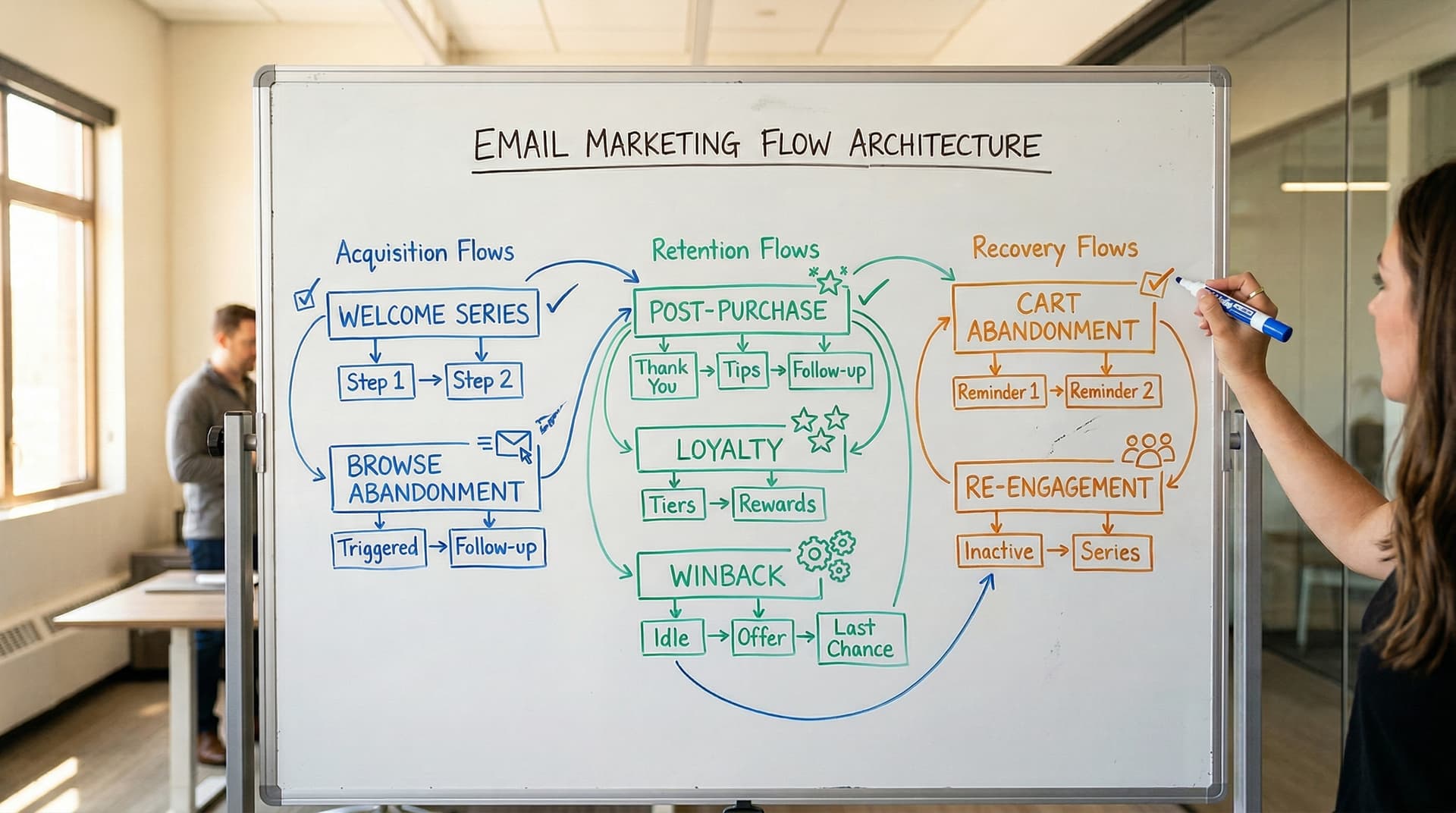
This is post 2 of 12 in the Ecommerce Email Lifecycle Series. Start with the complete strategy guide if you haven't already.
Ecommerce email flows are automated email sequences triggered by customer behavior — signing up, browsing, abandoning a cart, purchasing, or going inactive. The seven essential flows (welcome, browse abandonment, cart abandonment, post-purchase, cross-sell, win-back, and re-engagement) form the backbone of lifecycle email marketing and typically generate 30–50% of a store's total email revenue.
That last number is worth sitting with. Half of email revenue, generated automatically, from sequences you build once and optimize over time. No campaign calendar, no weekly sends, no content treadmill. Flows run in the background while you sleep, triggered by what your customers actually do. (If you want the full case for why flows outperform campaigns, our automation vs campaigns breakdown covers the 18x RPR gap in detail.)
The problem is that most stores only have two of them running. Welcome and cart abandonment. Maybe browse abandonment if someone got ambitious during a slow week. The other four don't exist, so customers fall through the gaps after they buy, go quiet with no system to pull them back, and eventually churn without anyone noticing.
This guide covers all seven — what goes in each one, when it triggers, what performance to expect, and how they connect. If you've read the pillar guide, you already know the overview. This is the blueprint.
The Ecommerce Email Lifecycle
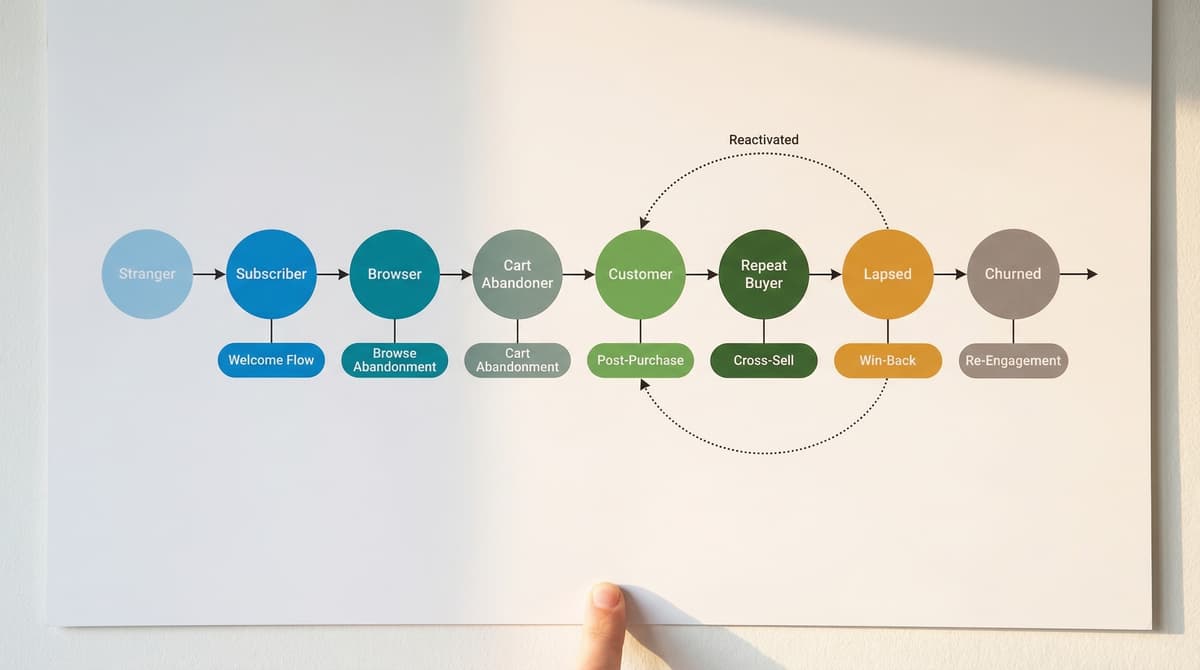
Every customer moves through the same stages. The email flows exist to influence what happens at each transition — whether someone moves forward toward another purchase or drifts backward toward churn.
Andriy Boychuk, founder of Flowium and creator of the Klaviyo Mastery course, teaches a structured framework for Klaviyo emails. The lifecycle approach maps every email a store sends to a specific customer stage, so nothing fires randomly and nothing gets missed.
Here's what that looks like in practice:
| Customer Stage | What Happened | Email Flow | Goal |
|---|---|---|---|
| Stranger → Subscriber | Signed up for your list | Welcome Series | Convert to first purchase |
| Subscriber → Browser | Viewed a product page | Browse Abandonment | Bring them back to buy |
| Browser → Cart Abandoner | Added to cart, didn't buy | Cart Abandonment | Recover the sale |
| Cart Abandoner → Customer | Completed purchase | Post-Purchase | Build the relationship |
| Customer → Repeat Buyer | Bought again (or should) | Cross-Sell / Upsell | Increase AOV and frequency |
| Repeat Buyer → Lapsed | Hasn't purchased in 60–120 days | Win-Back | Re-activate before churn |
| Lapsed → Churned (or not) | Hasn't engaged in 90+ days | Re-Engagement / Sunset | Reactivate or remove |
The rest of this post breaks down each flow.
Flow 1: Welcome Series
Trigger: Subscriber added to your email list (popup signup, checkout opt-in, footer form).
Timing: Email 1 immediately, then every 1–2 days over 5–7 days.
Expected performance: 50–80% open rate, 8–15% placed order rate for well-built series.
The welcome series is where most of your list's first purchases happen. These subscribers just told you they're interested. They're paying attention right now, in a way they won't be again for months. Open rates for welcome emails run 3–4x higher than any other flow because the subscriber is expecting to hear from you.
Most stores send a single welcome email — deliver the discount code, done. That leaves money on the table. A 3–5 email series over 7 days gives you space to do the job properly:
Email 1 (Immediate): Deliver whatever you promised at signup. If it's a discount code, lead with it. If it's a content offer, link to it. Don't bury the incentive under three paragraphs of brand story. The subscriber signed up for something specific. Give it to them.
Email 2 (Day 1–2): Brand story and values. Who you are, why you exist, what makes your product different. This is the email that builds trust before you start selling. Keep it genuine — customers can tell when a brand story is just a marketing exercise.
Email 3 (Day 3–4): Bestsellers and social proof. Show your most popular products. Include reviews, star ratings, UGC photos. Let other customers do the selling for you.
Email 4 (Day 5): Education or category guide. Help the subscriber figure out which product is right for them. If you sell skincare, this is the "find your routine" email. If you sell coffee, this is the "choose your roast" email.
Email 5 (Day 7): Urgency. If you offered a signup discount, this is the "your code expires tomorrow" email. Discount expiration is one of the most reliable conversion triggers in ecommerce email.
The welcome series should have a conditional split after Email 1: if the subscriber purchases from the welcome discount, skip them into the post-purchase flow instead of continuing to sell them something they already bought.
→ Welcome email best practices for ecommerce
Flow 2: Browse Abandonment
Trigger: Identified subscriber views a product page but doesn't add to cart.
Timing: Email 1 at 1–2 hours after browsing, Email 2 at 24 hours.
Expected performance: 34% open rate, 9.6x conversion rate vs. standard campaigns (Klaviyo, 2024).
One important caveat: "identified subscriber" means you can only send browse abandonment emails to people whose email address you already have — someone who's signed up, opted in, or logged in. Anonymous visitors who browse your site without identifying themselves won't trigger this flow. This is why your signup popup conversion rate (covered in our browse abandonment guide) directly limits your browse abandonment volume. Stores that complain about low browse flow volume usually have an identification problem, not a flow problem.
That said, browse abandonment still catches the largest pool of potential customers that most stores ignore. Only about 6% of visitors add something to their cart, which means the vast majority of engaged product-page visitors who are identified are browse abandonment candidates.
The flow is usually 2 emails. The first is a gentle reminder — "Still thinking about [product]?" with the product image, a few reviews, and a link back. The second, 24 hours later, adds social proof or related products.
Two things to get right: First, the tone. Browse abandonment emails can feel creepy if they read like surveillance. The subscriber looked at a product; they didn't commit to anything. Write it like a helpful shopkeeper, not a tracking pixel. Second, the suppression logic. If a browse abandoner adds to cart after Email 1, they should exit this flow and enter the cart abandonment flow instead. Higher-intent triggers always win.
Browse abandonment is the third flow to build (after welcome and cart), because the volume is high but the intent per subscriber is lower. Get the first two right before you invest here.
→ Browse abandonment: the complete strategy guide
Flow 3: Cart Abandonment
Trigger: Subscriber adds a product to cart but doesn't complete checkout.
Timing: Email 1 at 30 minutes, Email 2 at 24 hours, Email 3 at 48 hours.
Expected performance: $3.65 average RPR, top 10% hit $28.89 (Klaviyo, 2024).
This is the highest-intent automated flow you can build. Someone chose a product, selected a size or variant, and added it to their cart. They were close. Three emails is usually enough to find out why they stopped.
Email 1 (30 min): Simple reminder. Product image, cart contents, one-click return-to-cart link. No discount. Most recoveries happen at full price in Email 1, and sending at 30 minutes converts 3–5x better than waiting four hours.
Email 2 (24 hours): Objection handling. Reviews, star ratings, customer photos. Address the reasons people actually abandon: shipping costs, return policy concerns, product questions. The goal is to answer whatever doubt stopped them from clicking "complete order."
Email 3 (48 hours): Incentive (if your margins support it). Free shipping converts 2x better than percentage discounts. If you offer a discount, make it conditional on cart value — don't give away margin on a $15 order. If you don't offer a discount, use urgency instead: "Your cart is about to expire" or low-stock alerts.
The cart abandonment flow should split by customer type. First-time buyers and returning customers abandon for different reasons. Returning customers don't need a discount; they've already committed to your brand once. First-time buyers might need more trust-building.
If you're running SMS alongside email, cart abandonment is the flow where it makes the most difference. SMS at 15 minutes (before Email 1) catches people while they're still near their phone with your store fresh in their mind. Email and SMS together recover more revenue than either channel alone — but SMS only reaches subscribers who've opted in to texts, which is typically 20–40% of your list.
→ Abandoned cart email: the ultimate guide
Flow 4: Post-Purchase
Trigger: Customer places an order.
Timing: Spans from order confirmation through 60 days post-delivery.
Expected performance: Directly impacts repeat purchase rate (industry average: 27%, top performers: 40%+).
Everything up to this point in the lifecycle is acquisition. Getting someone to buy once. The post-purchase flow is where the relationship either starts or dies. Most stores let it die by sending a Shopify default order confirmation and nothing else for 60 days.
"A good ecommerce business will have 30 to 40 percent of its revenue coming from email." — Ezra Firestone, Founder, Smart Marketer (SmartMarketer.com)
That number is only possible if your post-purchase flow is actually doing its job. Firestone's advice: "If you do nothing else that I show you today, do your post-purchase flow well."
A real post-purchase sequence runs 5–7 emails:
- Order confirmation (immediate): Branded confirmation with order details, expected delivery, and a cross-sell suggestion. Most stores use the Shopify default here. Don't — build a branded version in Klaviyo with dynamic product blocks.
- Shipping notification (when shipped): Tracking info plus anticipation-building content. What to expect, how to use the product, care instructions.
- Delivery follow-up (delivery day + 1): "Your order arrived — here's how to get the most from it." Usage tips, FAQ link, support contact.
- Check-in (day 5–7 post-delivery): "How's your [product]?" Soft touch. Not selling yet, just showing you care. This email lowers return rates.
- Review request (day 10–14): Ask for the review when they've had enough time to use the product. One-click star rating works better than asking them to write a paragraph.
- Cross-sell (day 21–30): Recommend complementary products based on what they bought. Dynamic product blocks beat manual curation.
- Replenishment (day 45–60): For consumable products only. "Time for a refill?" with a one-click reorder link.
Timing depends on your product. A supplement brand might trigger replenishment at 25 days. A furniture brand skips it entirely. Don't copy someone else's post-purchase sequence — adjust the timing to match how your customers actually use what they bought.
→ Post-purchase email: the complete guide
→ Post-purchase templates and timing
Flow 5: Cross-Sell / Upsell
Most stores think about cross-sell and upsell as one-off campaign ideas. They're better as automated flows, triggered by what someone already bought, timed to land after they've actually used the product. Conversion rates run 2–5%, and the AOV lift compounds over the customer's lifetime.
Cross-sell recommends complementary products ("you bought the shoes, here are the socks"). Upsell promotes higher-value alternatives or bundles ("upgrade to the 3-pack and save 15%"). Both are about increasing how much each customer spends with you over time.
These emails work best after the customer has received and used their first purchase. Sending a cross-sell the day after someone orders is premature. Wait until the post-purchase flow has done its job, then transition into recommendations.
Honestly, the recommendation logic matters more than the copy here. Klaviyo's catalog-based recommendations pull from your actual purchase data to suggest what customers in similar segments buy next. If 40% of customers who buy your moisturizer also buy your serum within 30 days, Klaviyo surfaces that pattern automatically. For stores with smaller catalogs, manual curation works fine — map your products into "next purchase" groups and build conditional splits based on what was ordered.
→ Cross-sell and upsell emails
Flow 6: Win-Back
Trigger: Customer hasn't purchased in a defined period (typically 60, 90, or 120 days).
Timing: 4 emails over 21 days after the trigger.
Expected performance: 5–15% reactivation rate for well-built sequences.
Win-back targets customers who bought from you before but haven't come back. These are people who already trusted you with their money once. Getting them back is significantly cheaper than acquiring someone new.
When to trigger depends on what you sell. A supplement brand with a 30-day supply should trigger win-back at 45–60 days. A fashion brand where customers buy seasonally might set the trigger at 120 days. A useful rule of thumb: take your average time between repeat purchases and add 50%. If your average repeat customer buys again in 60 days, set the win-back trigger at 90.
The sequence escalates over four emails. Start soft — "We haven't seen you in a while," showing what's new since their last purchase. New products, new collections, anything that gives them a reason to come back. Email two leans on social proof: bestsellers with reviews, letting other customers do the persuading. Email three introduces an incentive if your margins support it. Free shipping works well. A percentage discount works too, but don't lead with it — customers who would have come back at full price don't need a discount, and you've just cut your margin for nothing. Email four is the last chance: "We're going to stop emailing you unless we hear back." If they don't respond, they move to re-engagement or sunset.
The win-back flow should split by customer lifetime value. A customer who's spent $2,000 with you over three orders deserves a different approach than someone who bought once for $30. High-value lapsed customers might warrant a personal email from a real person, not just an automated sequence.
→ Win-back email guide
→ Win-back email examples and templates
Flow 7: Re-Engagement / Sunset
This is the flow nobody wants to build because it means admitting some subscribers are gone. But ignoring them is worse — inactive subscribers actively hurt your deliverability for everyone else. The reactivation rate is low (2–5%), but the real return is protecting inbox placement for your engaged list.
Re-engagement is different from win-back. Win-back targets lapsed purchasers. Re-engagement targets dormant subscribers who may or may not have ever bought from you. They're still on your list, they're still receiving emails, but they've stopped opening and clicking.
The reason this matters goes beyond those individual subscribers. Gmail and Yahoo look at your overall engagement rates when deciding whether to deliver your emails to the inbox or the spam folder. A list full of people who never open drags down deliverability for everyone — including the customers who actually want to hear from you. That's why re-engagement is as much about protecting your engaged list as it is about recovering dormant subscribers.
Three emails is all you get. The first is a gentle nudge — "Are you still interested?" — showing your best recent content or products. No hard sell. The second curates what they've missed: new products, popular content, something genuinely worth reopening the relationship for. The third is direct: "Should we stop emailing you?" with an explicit opt-in button. "Click here to stay, or we'll remove you in 7 days." This sounds aggressive. It works. The subscribers who click are worth keeping. The ones who don't were already gone.
If no response after the third email, suppress them. Don't delete — suppress. You keep the data, you just stop sending. Some brands move suppressed subscribers to a quarterly check-in (one email every 90 days) rather than removing them entirely.
One important note: since Apple MPP inflated open rates starting in 2021, you can't use opens alone to define "inactive." Use click-based engagement windows instead. A subscriber who hasn't clicked anything in 90 days is genuinely inactive. A subscriber who hasn't opened might just have MPP making it look like they open everything.
→ Re-engagement email guide
→ Re-engagement examples and subject lines
How These Flows Work Together
Building all seven flows is step one. Step two — and this is where most implementations break — is making sure they don't collide. A subscriber should never receive emails from two flows at the same time. Higher-intent triggers always override lower-intent ones.
The handoff rules:
- If a browse abandoner adds to cart → exit browse flow, enter cart flow
- If a cart abandoner completes purchase → exit cart flow, enter post-purchase flow
- If a welcome subscriber triggers browse abandonment → welcome series takes priority (they're already in a sequence)
- If a win-back recipient purchases → exit win-back, enter post-purchase
- If a re-engagement subscriber clicks → exit re-engagement, return to normal sending
In Klaviyo, this is managed through flow filters and exclusion logic. Each flow should filter out subscribers who are currently active in a higher-priority flow. Without these filters, you end up sending someone three to five emails in a week from different automations, which is how you train people to unsubscribe.
"If they would slow down and be more strategic and focus on quality, they'd see way more results from email." — Dylan Kelley, Founder, Wavebreak (Foundr)
Kelley's point applies directly here. The brands that do this well don't do it by sending more emails. They do it by building a system where each email has a clear job and nothing overlaps.
Revenue contribution by flow
Exact numbers vary by brand, but here's a rough benchmark for how revenue distributes across the seven flows:
| Flow | Typical Share of Flow Revenue | Notes |
|---|---|---|
| Cart abandonment | 30–40% | Highest intent, highest RPR |
| Welcome series | 15–25% | High volume, strong conversion |
| Browse abandonment | 10–20% | Large pool, lower intent |
| Post-purchase / cross-sell | 10–15% | Builds over time as customer base grows |
| Win-back | 5–10% | Depends on lapsed customer volume |
| Re-engagement | 1–3% | Value is mostly in deliverability, not revenue |
If your cart abandonment flow is generating 80%+ of flow revenue, that means your other flows are either underbuilt or missing. A healthy distribution looks more like the table above.
One thing to watch: when a customer passes through multiple flows before purchasing (welcome → browse abandonment → cart abandonment → purchase), your ESP will attribute that revenue to whichever flow sent the last email before the order. That's usually cart abandonment, which is why cart's share looks so dominant. It doesn't mean the earlier flows were useless — they moved the customer through the lifecycle. Revenue per recipient (RPR) measured per-flow gives you a better picture of each flow's contribution than looking at attributed revenue alone.
Building in Klaviyo vs. Shopify Native
Shopify's built-in email automations have improved over the past two years. For very small stores (under $250K annual revenue, small list), Shopify Email can handle basic welcome and cart abandonment flows at no extra cost.
But "basic" is the limit. Shopify's native automations lack conditional splits, A/B testing within flows, and the segmentation depth needed for flows 4–7. You can't build a post-purchase sequence with product-specific content or a win-back flow with CLV-based splits using Shopify Email alone.
The upgrade path: under $250K revenue with a small list, Shopify Email handles welcome and cart fine. Between $250K and $1M, Omnisend is worth a look — its visual flow builder and pre-built templates get you running faster than Klaviyo, and at a lower price point (~$115/mo vs ~$150/mo for 10K contacts). It handles flows 1–4 well. Above $1M, Klaviyo is the standard for all seven flows. The segmentation depth, predictive analytics, and conditional branching at that scale justify the premium. (See the full ESP comparison in our strategy guide for a detailed breakdown.)
The actual trigger for upgrading isn't a revenue number. It's the moment you need a conditional split, a CLV-based flow filter, or product-specific dynamic content. When you hit that wall with Shopify native, you've outgrown it.
Most stores launch with one or two flows and never finish the rest. Geysera deploys all seven inside your Klaviyo account in 30 days — then measures each one by incremental lift, not last-click attribution. See the 7-flow system →
Frequently Asked Questions
What are ecommerce email flows?
Ecommerce email flows are automated sequences triggered by specific customer actions — joining your list, viewing a product, abandoning a cart, making a purchase, or going inactive. Unlike campaigns (which are sent manually to a list), flows run automatically in the background, delivering the right message at the right moment based on what each customer actually did.
How many email flows does an ecommerce store need?
A complete ecommerce email program has seven flows: welcome series, browse abandonment, cart abandonment, post-purchase, cross-sell/upsell, win-back, and re-engagement/sunset. Most stores start with two or three (welcome and cart are the minimum). The rest should be built as the business and list grow. Each missing flow is a gap in the lifecycle where customers fall through without a system to catch them.
Which email flow generates the most revenue?
Cart abandonment typically generates the most revenue per flow (30–40% of total flow revenue) because the purchase intent is highest. However, the welcome series often surprises — it processes the most recipients and can generate 15–25% of flow revenue. The real answer depends on your business: stores with large repeat-buyer bases may see post-purchase and cross-sell flows rival cart abandonment over time.
What's the difference between email flows and email campaigns?
Flows are automated and behavioral — they trigger based on what a customer does (browses, carts, purchases, goes inactive). Campaigns are manual broadcasts sent to a segment of your list (product launches, sales, newsletters). Flows generate 37% of email revenue from just 2% of sends (Klaviyo, 2024). Campaigns require ongoing effort; flows run once built.
How do I set up email flows in Klaviyo?
Each Klaviyo flow starts with a trigger (e.g., "Added to Cart," "Placed Order," "Joined List"), followed by time delays, conditional splits, and email actions. Build each flow with flow filters to prevent overlap with other active flows. Start with the welcome series (trigger: Added to List) and cart abandonment (trigger: Started Checkout or Added to Cart), then add flows in priority order as your list grows.
What order should I build my email flows in?
Build in this order: (1) Welcome series, (2) Cart abandonment, (3) Browse abandonment, (4) Post-purchase, (5) Win-back, (6) Cross-sell/upsell, (7) Re-engagement/sunset. The first three capture roughly 70% of total flow revenue, so build those before investing in the rest. After that, post-purchase and win-back have the most impact on retention. Cross-sell and re-engagement round out the system.
Continue the Series
Previous: Ecommerce Email Marketing: The Complete Strategy Guide
Next: Welcome Email Best Practices for Ecommerce
Full series: Ecommerce Email Lifecycle Series
Sources
- Klaviyo: Ecommerce Email Marketing Benchmarks (2024)
- Ezra Firestone: Secret to E-Commerce Success — Smart Marketer
- Dylan Kelley: Email & SMS Strategies — Foundr

Co-Founder and CEO
Bob Thordarson is CEO and Co-Founder of Geysera, a serial entrepreneur with 25+ years and five co-founded ventures, including Cequint (acquired by TNS in 2010 for $112.5M) and Consumerware (acquired by ParkerVision). A graduate of the University of Washington and MIT Entrepreneurial Masters Program, based in Seattle, he serves on the boards of DRY Soda Co. and the Entrepreneurs' Organization Seattle chapter. He is an expert in retention marketing email systems and methodology for ecommerce and B2B brands — measured by incremental revenue, not vanity metrics.