Post-Purchase Follow-Up Emails: Templates & Timing for Every Stage
Six post-purchase email templates you can adapt to your brand and drop into Klaviyo today.
This is post 5 of 12 in the Ecommerce Email Lifecycle Series. Previous: Post-Purchase Email: The Flow That Turns One-Time Buyers Into Repeat Customers.
Post-purchase follow-up emails are a timed sequence sent after a customer completes an order, covering order confirmation, shipping updates, delivery check-ins, review requests, and cross-sell recommendations. These templates provide ready-to-use copy for each stage of the post-purchase timeline — from the moment of purchase through 60 days after delivery.
If you've read the post-purchase strategy guide, you know why each email matters and when to send it. This post gives you the actual copy. Six templates you can adapt to your brand, drop into Klaviyo, and have running by the end of the week.
Every template below follows the same structure: a subject line, a preview text, a body, and notes on what to customize. They're written for a general ecommerce brand — you'll need to adjust the tone, product references, and CTAs to match your voice.
A note on preview text: on mobile (where 60%+ of ecommerce emails are opened), preview text is the only thing visible besides the subject line and sender name. It's your second chance to get the open. Keep it under 90 characters, make it complement the subject line rather than repeat it, and never leave it blank — if you do, the email client will pull the first line of your body copy, which is usually "Hi [Name]" or a navigation link. Not great.
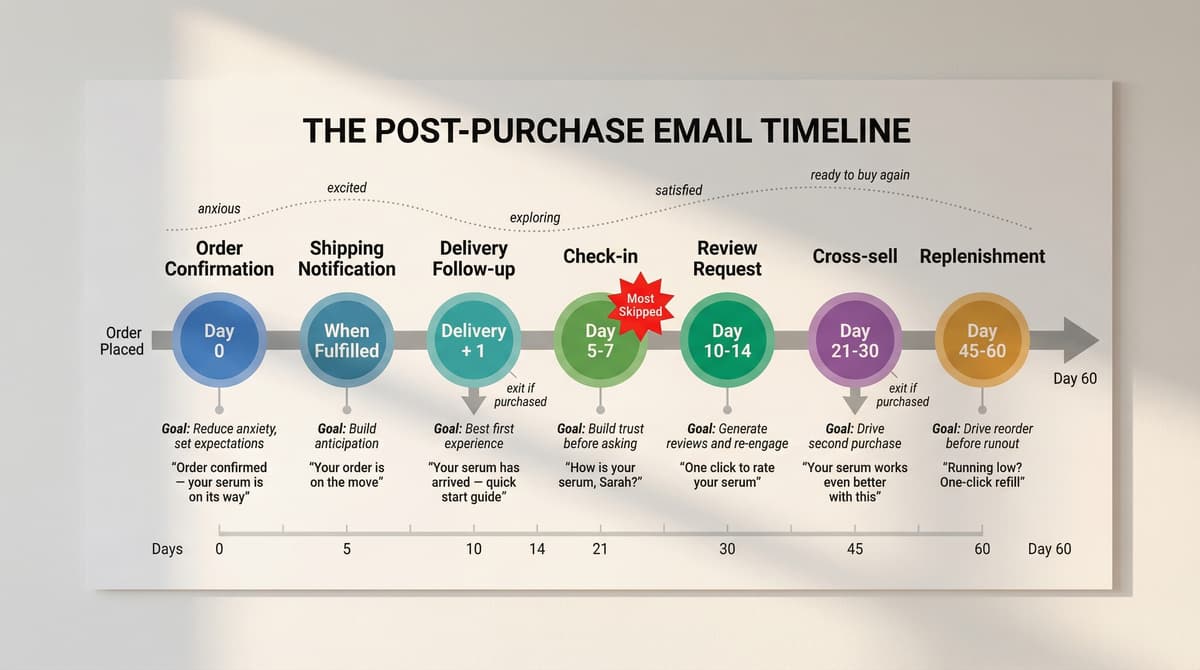
The Post-Purchase Timeline
Template 1: Order Confirmation
When: Immediately after purchase
Goal: Confirm the order, reduce anxiety, set expectations
Subject line options:
- Order confirmed — your [product] is on its way
- Thanks, [Name] — we got your order
- Your [Brand] order (#[number]) is confirmed
Preview text: Here's what happens next.
Body:
Hi [Name],
Your order is confirmed. Here's what you ordered:
[Dynamic product block: product image, name, quantity, price]
Order total: [total]
Estimated delivery: [date range]
What happens next: We're packing your order now. You'll get a shipping email with tracking as soon as it's on its way.
[Single CTA button: "Track your order" → order status page]
P.S. Customers who love [product] also grab [complementary product]. [Link]
Customize: The P.S. cross-sell is optional — it works because the customer is still in a buying mindset, but don't let it overshadow the order details. That's what the customer actually opened this email for. If you build this in Klaviyo, disable Shopify's native order confirmation or the customer gets two emails for the same order.
Template 2: Shipping Notification
When: Order is fulfilled / shipped
Goal: Deliver tracking info, build anticipation
Subject line options:
- Your [product] just shipped — track it here
- [Name], your order is on its way
- Shipped! Here's what to know before it arrives
Preview text: Track your package + a few things to know.
Body:
Hi [Name],
Good news — your [product] is on its way.
Tracking number: [tracking link]
Estimated delivery: [date]
While you wait: [1–2 sentences of anticipation content specific to the product. Examples:]
- Skincare: "Here's a quick guide to building [product] into your routine — so you're ready to start the day it arrives."
- Supplements: "Quick tip: take [product] with food for best absorption. More usage details when it lands."
- Fashion: "Need styling ideas? Here's how other customers are wearing [product]."
[CTA button: "Track your package"]
Notes: Ryan Turner of Ecommerce Intelligence, whom a DripDrop client credits with helping double its total revenue year over year, is a reminder that fundamentals matter, and the shipping notification is one most stores phone in. A bare tracking link is a wasted email. The anticipation content ("here's how to use it when it arrives") gives the customer something to look forward to and primes them for a better first experience with the product.
Template 3: Delivery + First Use
When: Day after delivery (or 5 days post-fulfillment if no delivery tracking)
Goal: Help the customer have the best first experience
Subject line options:
- Your [product] is here — quick start guide inside
- It's arrived! Here's how to get the most from [product]
- [Name], your [product] just landed
Preview text: A few tips so you get the best results from day one.
Body:
Hi [Name],
Your [product] should be with you by now. Here's how to get the most from it:
[2–3 product-specific tips. Examples:]
For skincare:
- Cleanse first, then apply [product] to damp skin
- Use a pea-sized amount — a little goes a long way
- Give it 2 weeks before judging results (your skin needs time to adjust)
For supplements:
- Take with breakfast for best absorption
- Stay consistent — daily use matters more than exact timing
- Store in a cool, dry place (not the bathroom)
For tech/electronics:
- Charge fully before first use
- Download the [Brand] app for setup [link]
- Quick-start video: [link to 90-second tutorial]
Have questions? Our support team is here: [support link]
Why this works: The customer just got the product. If something's wrong — damaged, missing parts, wrong size — this is the moment they find out. A visible support link catches those problems before they become one-star reviews or angry social posts. For customers whose order arrived fine, the usage tips give them a reason to open your email that isn't a sales pitch. Either way, you've earned a little more trust before you ask for anything.
Template 3.5: Check-In
When: Day 5–7 after delivery
Goal: Build trust before you ask for anything
This is the template most stores don't have because they don't know what to write. There's no CTA and no product recommendation. It's just a genuine "how's it going?" — and that simplicity is what makes it effective.
Subject line options:
- How's your [product], [Name]?
- Quick check — everything good with your order?
- Been a few days — how are you liking it?
Preview text: Just checking in (no sales pitch, promise).
Body:
Hi [Name],
You've had your [product] for a few days now. How's it going?
If everything's great — awesome, we're glad. If something's not right, we want to fix it. Just reply to this email or reach out to our team: [support link]
[Optional: one product-specific nudge that isn't a sell. Examples:]
- Skincare: "Quick reminder: give it at least 2 weeks before you judge the results. Your skin is still adjusting."
- Supplements: "Pro tip from our customers: pairing [product] with [complementary habit] makes a noticeable difference."
- Fashion: "If the fit isn't perfect, our free exchange process takes about 2 minutes: [link]"
Talk soon, [Name or Team Name]
Why this matters: This email lowers return rates because a customer who feels checked on is less likely to return a product than one who feels ignored after the sale. It also sets up the review request (next email) — a customer who just had a positive interaction with your brand is more likely to leave a review. If you only have time to add one new email to your post-purchase flow, this is the one.
Template 4: Review Request
When: 10–14 days after delivery
Goal: Generate reviews and re-engage the customer
Subject line options:
- [Name], how's your [product]?
- Mind leaving a quick review? (Takes 30 seconds)
- Loved your [product]? One click to tell us
Preview text: Your feedback helps other shoppers decide.
Body:
Hi [Name],
You've had your [product] for a couple of weeks now. We'd love to hear what you think.
[One-click star rating widget — Judge.me, Yotpo, or Stamped all support inline ratings]
⭐⭐⭐⭐⭐ — Rate your [product]
It takes about 30 seconds and helps other customers make better decisions.
Want to share a photo? Upload a picture of your [product] in action and get [incentive: 5% off your next order / 50 loyalty points / entry into our monthly giveaway].
[CTA button: "Leave a review"]
What makes this convert: The inline star rating. If you ask customers to click through to your site, find the product, scroll to reviews, and write a paragraph, almost nobody will. Put the rating widget directly in the email and responses go up 3–5x. Photo reviews with a small incentive build your UGC library for ads and product pages. And there's a side benefit — customers who visit your site to leave a review sometimes end up browsing and buying again.
Template 5: Cross-Sell Recommendation
When: 21–30 days after purchase
Goal: Drive a second purchase with a relevant recommendation
Subject line options:
- Your [product] works even better with this
- Customers who got [product] also love [recommendation]
- [Name], ready for the next step?
Preview text: One product that pairs perfectly with what you bought.
Body:
Hi [Name],
You've been using [product] for a few weeks. If you're loving it, here's something that pairs well:
[Dynamic product block: single complementary product with image, name, price, star rating]
Why these go together: [1–2 sentences explaining the pairing — be specific, not generic.]
For supplements, that might be: "Most customers who start with our Vitamin D add Magnesium within the first month — they work together for better sleep and recovery." For footwear: "Our [shoe] customers tell us [sock] is the perfect match — same moisture-wicking tech, designed to fit together." The pairing explanation is what separates a helpful recommendation from a random product push.
[CTA button: "Add to cart" or "Shop now"]
Notes: One product, not a grid. The work is in the recommendation logic. If 40% of customers who buy product A also buy product B within 30 days, that's the recommendation. In Klaviyo, catalog-based recommendations handle this automatically for stores with enough purchase data. Smaller stores should manually map their best product pairings and build conditional splits by product purchased.
→ Cross-sell and upsell emails: the complete guide
Template 6: Replenishment Reminder
When: When the product is likely running out (varies by product — 25–60 days)
Goal: Drive a reorder before the customer runs out
Subject line options:
- Running low on [product]? One-click refill
- Time to restock, [Name]
- Your [product] supply is getting low
Preview text: Reorder in one click — no searching required.
Body:
Hi [Name],
Based on when you ordered, your [product] is probably running low.
[Product image + "Reorder" button that pre-fills cart]
Reorder the same: [CTA button: "Reorder [product]" → pre-filled cart link]
Or subscribe and never run out: Subscribe to [product] and save [X]% on every delivery. Choose your frequency — every 30, 60, or 90 days.
[CTA button: "Subscribe & save"]
When to use this: Only for consumable products — supplements, skincare, food, coffee, pet supplies, cleaning products. If you sell clothing or electronics, skip this email entirely. The pre-filled cart link is the key detail. The customer doesn't have to search, add to cart, and check out. One click and they're at checkout with the same product loaded. And if you offer subscriptions, this is the one email where "subscribe and save" actually feels helpful instead of salesy, because the customer already knows they need more.
Adapting These Templates to Your Brand
These templates are scaffolding. They'll work as-is for testing, but the brands that get the best results customize them.
Start with tone of voice. A luxury skincare brand and a novelty socks brand should not sound the same in their post-purchase emails. Read your templates out loud. Do they sound like your brand or like a generic email marketing guide? If it's the latter, rewrite the copy in your voice. Keep the structure and timing — change the words.
Then build in product-specific content. The delivery email for a supplement should include dosage instructions. For a tech product, setup steps. For clothing, care instructions. In Klaviyo, conditional splits by product category make this automatic — each customer gets content relevant to what they bought.
These templates assume Klaviyo + Shopify, which is the most common stack. If you're on WooCommerce, the "Placed Order" trigger works the same way through Klaviyo's WooCommerce integration. On Omnisend, the flow builder supports similar logic with different trigger names. The timing and copy don't change by platform.
Once these are live and generating data, start testing. The highest-leverage tests for post-purchase emails: review request timing (day 10 vs day 14), cross-sell product selection (algorithmic vs manually curated), and replenishment reminder timing (5 days before expected runout vs 3 days). Subject line tests matter too, but the structural tests affect revenue more directly. Run one test at a time and give each at least 1,000 recipients before drawing conclusions.
The stores that get the best results from templates like these don't just drop them in unchanged. They use the structure as a starting point, then test subject lines, incentive types, and timing against their own data. Start with these, measure the results, then iterate. The same approach applies to your other flows — we covered subject line testing for cart abandonment and the copywriting approach for browse abandonment in earlier guides.
If you want to go deeper on the strategy behind each email — why it exists, what metrics to track, how to measure the flow's impact on repeat purchase rate — that's covered in the post-purchase email strategy guide.
These templates are a starting point. Geysera builds post-purchase flows with dynamic product blocks, personalized timing based on your shipping data, and review triggers that actually generate UGC. See what a custom flow looks like →
Frequently Asked Questions
What should I include in a post-purchase follow-up email?
It depends on which email in the sequence you're building. An order confirmation needs order details and a delivery estimate. A shipping notification needs tracking info plus anticipation content (what to expect when the product arrives). The delivery follow-up needs product-specific usage tips and a visible support link. The check-in is deliberately simple — just ask how it's going. Review requests work best with a one-click star rating widget. Cross-sells need one relevant product recommendation, not a product grid.
How soon after purchase should I send a follow-up email?
The order confirmation should send immediately. After that, the shipping notification goes when the order fulfills, the delivery follow-up at delivery + 1 day, the check-in at day 5–7, the review request at day 10–14, and the cross-sell at day 21–30. See the timing table by product category for adjustments based on what you sell.
What are the best post-purchase email subject lines?
Subject lines with the customer's name and the specific product name outperform generic ones. "How's your Vitamin D, Sarah?" beats "How's your recent purchase?" For order confirmations, go direct: "Order confirmed — your [product] is on its way." For review requests, reduce friction: "One click to rate your [product]." The full subject line list by email type is in the strategy guide.
How do I ask for a review without being pushy?
Time it right (10–14 days after delivery), make it easy (one-click star rating in the email, not a multi-step process), and offer a small incentive for photo reviews. Frame it as helping other customers: "Your feedback helps other shoppers decide." Don't ask more than once — if they ignore the review request, that's their answer.
When should I send a replenishment reminder email?
Calculate based on your product's typical usage cycle. A 30-day supplement supply gets a reminder at day 25–30. A 60-day skincare product gets one at day 50–55. The goal is to catch customers right before they run out, not after. If you're not sure about your usage cycle, look at the average time between repeat purchases for that product in your analytics.
Continue the Series
Previous: Post-Purchase Email: The Flow That Turns One-Time Buyers Into Repeat Customers
Next: Win-Back Email: How to Re-Activate Lapsed Ecommerce Customers
Full series: Ecommerce Email Lifecycle Series
Sources
- Ryan Turner / Ecommerce Intelligence
- Chronos Agency: Post-Purchase Flow Guide
- Rejoiner: Retention Marketing Software for Ecommerce

Co-Founder and CEO
Bob Thordarson is CEO and Co-Founder of Geysera, a serial entrepreneur with 25+ years and five co-founded ventures, including Cequint (acquired by TNS in 2010 for $112.5M) and Consumerware (acquired by ParkerVision). A graduate of the University of Washington and MIT Entrepreneurial Masters Program, based in Seattle, he serves on the boards of DRY Soda Co. and the Entrepreneurs' Organization Seattle chapter. He is an expert in retention marketing email systems and methodology for ecommerce and B2B brands — measured by incremental revenue, not vanity metrics.