Abandoned Cart Email Design: Templates, Layout, and CTA Best Practices for 2026
The cart emails that look best often perform worst. Hero banners, lifestyle photos, recommendation grids — beautiful, terrible for conversions. The emails recovering 3x more carts are simple: one large product image, one CTA above the fold, under 150 words. 80% of abandonment is mobile, so single-column and 44px tap targets are not optional. Dark mode breaks 39% of inboxes if you skip testing. CTA button design, mobile templates, and layout by brand type — luxury to DTC to B2B.
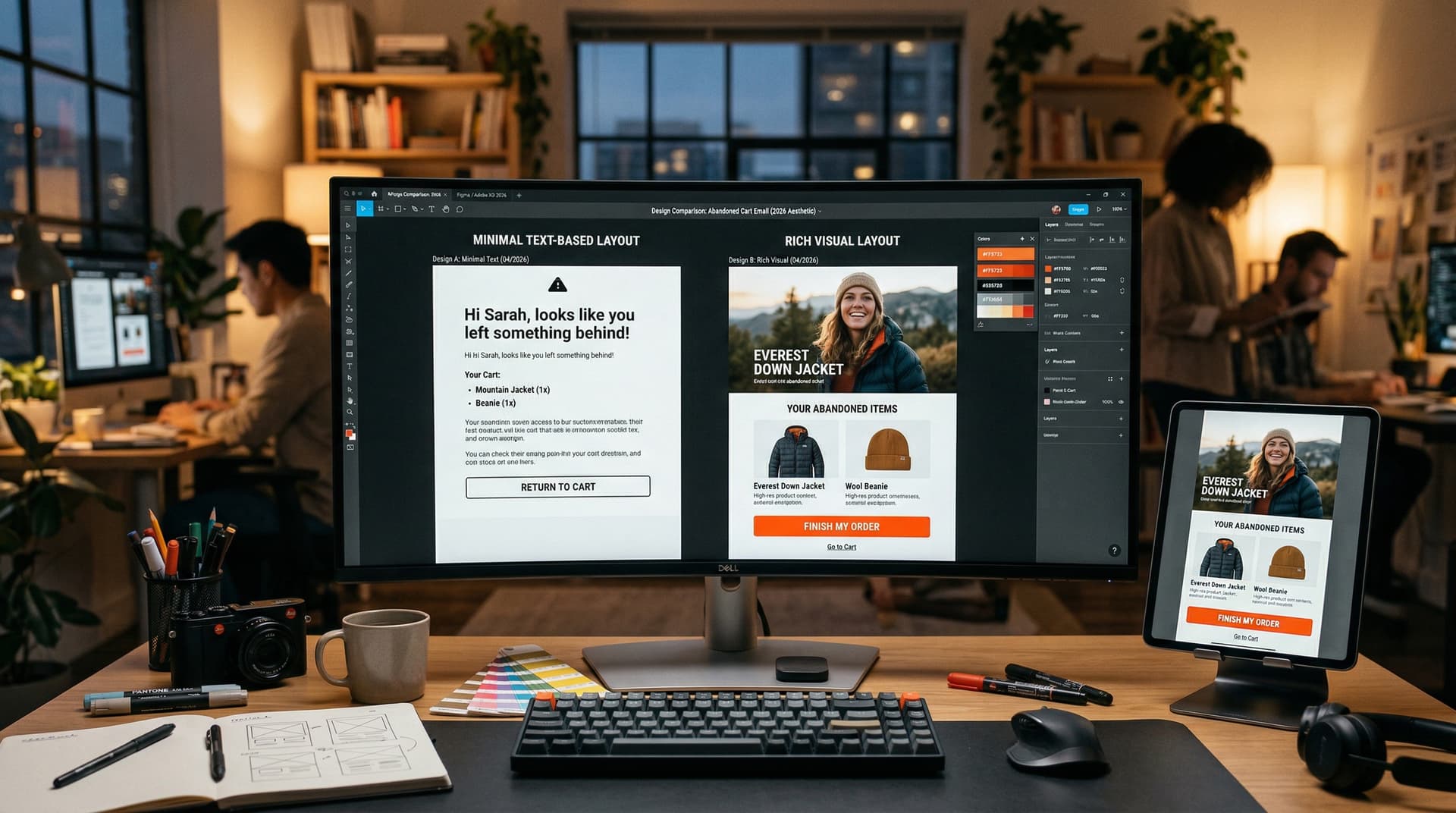
Most cart emails look the same. Product image, "Complete your purchase" button, done. Here's why some layouts recover 3x more carts than others.
The short version
- The product image does 60-70% of the work. If it's small, blurry, or missing, nothing else matters.
- One CTA button outperforms multiple CTAs. Every "Shop more" or "Browse similar" link you add competes with the cart return button and reduces conversions.
- CTA buttons need to be at least 44x44 pixels for mobile tap targets. Minimum 14px font for body text. Single-column layout, no horizontal scrolling.
- Place your first CTA above the fold. Repeat it at the bottom. Two placements of the same CTA beat one.
- 80% of cart abandonment happens on mobile. If you're designing on a desktop monitor and not checking your phone, you're optimizing for the minority.
- Dark mode breaks more cart emails than most marketers realize. 39% of mobile users have it on. Test before you send.
- The best-performing cart emails have under 150 words of body copy. The design carries the message, not the writing.
Here's something I notice when reviewing abandoned cart emails across dozens of brands: the ones that look the best often perform the worst. Elaborate designs with hero banners, lifestyle photography, multiple product recommendation rows, and social media icon grids. Beautiful to look at. Terrible for getting someone back to their cart.
The cart recovery email has one job: show the customer what they left behind and give them a frictionless path back to checkout. Every design element that doesn't serve that job is a distraction. And in email design, distraction costs money.
This guide covers the anatomy of a high-converting cart email layout, the CTA decisions that actually move click rates, how to design for mobile and dark mode, and when to use different design approaches based on your brand positioning. We also include template structures you can adapt for your own flows.
This post is part of our Abandoned Cart Email Ultimate Guide series.
Abandoned cart email design directly impacts recovery rates. The highest-converting cart emails use a single-column layout, one dominant product image, a contrasting CTA button above the fold, and minimal navigation — anything that adds friction between "open" and "buy" reduces conversions.
The anatomy of a cart email that converts
From top to bottom, here's the structure that consistently outperforms in testing:
1. Header (minimal)
Your logo. Small. Top-left or centered. That's it.
Not a navigation bar. Not a promotional banner. Not a "FREE SHIPPING ON ORDERS OVER $50" strip. Those belong in campaigns. In a cart recovery email, every pixel of header space that isn't the logo pushes the product image further down the screen, which means further away from the customer's attention on mobile.
Some of the highest-performing cart emails skip the header entirely and go straight to the product. Allbirds does this. The email opens with "Your cart is waiting" and the shoe image. No logo, no banner, nothing. It works because the customer already knows who it's from (the sender name) and doesn't need a branded header to recognize the email.
2. Headline (one line)
Short. Direct. Personal if possible.
"[Name], you left something behind" or "Still want the [Product]?" or just "Your cart is waiting."
Don't burn this space on a long paragraph. The headline orients the customer. The product image does the selling. One sentence is enough.
3. Product block (the core)
This is the single most important element in the email. The customer needs to see the specific item they abandoned, clearly enough to trigger the recognition and desire that put it in the cart.
What to include in the product block:
- Product image (large -- at least 300px wide, ideally 400-600px)
- Product name
- Price
- Size/color/variant if applicable
- Quantity
What to exclude:
- Related products (not in email 1 -- this is a distraction)
- Product descriptions (they already know what it is)
- Marketing copy about the product (save it for email 2)
Most ESPs pull the product data dynamically from the cart event. In Klaviyo, this is the event variable block. In Omnisend, it's the abandoned product block. In Mailchimp, it's the product recommendation block tied to the cart trigger. Make sure the image resolution is high enough to look sharp on retina screens (2x resolution, so a 300px display width needs a 600px source image).
4. CTA button (primary)
One button. One action. "Complete your purchase" or "Return to your cart."
Place it directly below the product block. No copy between the product and the button if you can help it. The visual flow should be: see product > want product > tap button. Anything in between slows that flow.
More on CTA buttons in the next section.
5. Supporting content (email 2 and 3 only)
Email 1 should stop at the CTA. Maybe add a one-line note about free returns or shipping speed, but that's it.
Email 2 can add: customer reviews (1-2 short quotes), star rating, trust badges, return policy.
Email 3 can add: discount code, expiration notice, urgency messaging.
The supporting content goes below the primary CTA. Not above it. Not beside it. Below. The customer should hit the CTA first and only see the supporting content if they scroll past it.
6. Footer
Unsubscribe link (required by law). Physical address (CAN-SPAM). Optionally: "Questions? Reply to this email" or customer service link.
Don't put social media icons in the footer. Every link that isn't "return to cart" is a potential exit. A customer who clicks your Instagram link instead of the CTA has been lost to a design decision.
7. Second CTA (bottom)
Repeat the same CTA button at the bottom of the email. For longer emails (email 2 and 3 with supporting content), the customer who scrolls past the reviews or discount information should have a button waiting for them at the end. Two placements of one CTA beat one placement every time.
CTA button design
The CTA button is the conversion point of the entire email. Everything above it is there to get the customer to click it. Here's what the data and testing say about how to design it:
Size
Minimum 44x44 pixels. This is Apple's human interface guideline for tap targets on mobile. Anything smaller and people either miss the button, tap the wrong thing, or get frustrated and close the email. For cart recovery emails specifically, I'd go larger -- 48-56px height with generous horizontal padding. The button should be easy to hit with a thumb while the customer is half-paying attention on their phone.
Color
The specific color matters less than the contrast. A red button on a white background works. A green button on a white background works. A light gray button on a white background doesn't, because there's nothing to distinguish it from the email body.
According to HubSpot (2024), switching a CTA button from green to red increased conversions by 21%. According to Performable (2023), the same green-to-red switch produced a 30% lift in their tests. These are specific to their designs and audiences. The consistent finding across all tests is that contrast drives clicks, not a specific hex code.
Use your brand's primary accent color for the CTA if it has sufficient contrast against the email background. This keeps the email on-brand while making the button unmissable. If your brand color is too light or too subtle (pastels, light grays), use a darker variant or a complementary high-contrast color for the button only.
Copy
"Complete your purchase" and "Return to my cart" outperform vague labels like "Click here" or "Learn more." The CTA copy should tell the customer exactly what happens when they tap.
Keep it under 5 words. "Return to cart" is better than "Click here to return to your shopping cart and complete your purchase." The button is a label for an action, not a sentence.
First person ("Return to my cart") slightly outperforms second person ("Return to your cart") in some tests, likely because it feels like the customer's own decision rather than an instruction from the brand.
Placement
Above the fold for the first instance. Below supporting content for the second instance.
"Above the fold" on mobile means within the first 400-500 pixels of the email. For most single-column cart emails, that means: logo (optional), headline, product image, CTA. If the customer has to scroll to find the button, you've already lost some of them.
Mobile-first design
This section exists because 80% of cart abandonment happens on mobile. If your email isn't designed for phones first, you're building for a minority audience.
Single column, always
Multi-column layouts that display two or three products side by side look fine on desktop. On mobile, they either stack awkwardly, create horizontal scroll, or render the product images too small to trigger recognition. Single column. Always.
Font sizes
Minimum 14px for body text. 16px is better. On a phone screen, 12px text requires squinting or zooming. Neither leads to a click.
Subject line preview text is even more constrained. Mobile email clients show roughly 30-40 characters of the subject line before truncating. Design your subject lines for this width, not for desktop.
Image sizing
Product images should be at least 300px display width and use 2x resolution source images (600px) for retina screens. A blurry product image on an iPhone is worse than no image at all. It makes your brand look cheap.
Most ESPs automatically compress images for email delivery. Check that your images still look sharp after compression by sending a test email to your own phone. If the image looks soft, upload a higher-resolution source.
Touch targets
Every tappable element needs at least 44x44px of space. This includes the CTA button, any text links, and the unsubscribe link. Elements that are too close together cause accidental taps and frustration.
The gap between your CTA button and any other link should be at least 20px. If the customer accidentally taps a social media icon instead of the CTA because they're 8 pixels apart, that's a design failure you caused.
Loading speed
Mobile email connections vary. Some customers are on fast Wi-Fi. Others are on a bus with one bar of signal. Heavy emails with multiple high-resolution images, GIFs, and complex HTML take longer to render. In the time it takes to load, the customer has swiped to the next email.
Keep total email size under 100KB if possible. Use web-optimized images (JPEG for photos, PNG for logos and graphics with transparency). Avoid animated GIFs over 200KB. If the email takes more than 2-3 seconds to fully render on a slow connection, trim it.
Dark mode design
According to Litmus (2025), 39% of mobile email users have dark mode enabled. If your email wasn't designed for it, dark mode can break your layout in ways that range from ugly to unreadable.
How dark mode breaks cart emails
Email clients handle dark mode inconsistently. Apple Mail uses a hybrid approach that tries to adapt your email. Gmail on Android does aggressive color inversion that can turn your carefully chosen colors into something unrecognizable. Outlook varies between versions.
Common breakages:
- White backgrounds become dark, but white text on product images stays white, becoming invisible
- Logo on a transparent background disappears into the dark background
- CTA button colors get inverted, destroying contrast
- Product images with transparent backgrounds look like floating objects on a dark void
How to design for dark mode
Use the CSS media query @media (prefers-color-scheme: dark) to specify different colors for dark mode. Not all email clients support this, but the ones that do will render your dark mode styles correctly.
Avoid pure white (#FFFFFF) and pure black (#000000). These trigger aggressive automatic inversion in most clients. Use off-whites (#F7F7F7) and near-blacks (#1E1E1E) instead. They look nearly identical to pure white and black in light mode but behave much more predictably in dark mode.
Keep two versions of your logo: one for light backgrounds, one for dark. Load the correct version using the dark mode media query. If you can only maintain one, use a logo with a slight background padding or border so it doesn't disappear on dark backgrounds.
Give product images a small border or background color. A product photo floating in a dark void looks broken. A subtle 1px border or a card-style background behind the product image maintains the layout in dark mode.
Test every cart email in dark mode before sending. Litmus and Email on Acid both offer dark mode previews across multiple clients. If you don't have access to those tools, send a test email to your own phone with dark mode enabled and check it manually. It takes 60 seconds and catches problems that will otherwise reach thousands of customers.
Design by brand type
The design approach should match your brand positioning. A cart email from a luxury jeweler shouldn't look like one from a surf apparel company.
Minimal/luxury
Lots of white space (or dark space in dark mode). Large, high-quality product photography. Minimal copy -- sometimes just the product name and a CTA. No discount banners. No urgency language. The design itself communicates premium quality.
Brands doing this well: Moschino, Haoma, Everlane. The email feels like a product page, not a marketing email. For more real-world layouts, see our abandoned cart email examples.
Casual DTC
Brand personality in the copy and colors. Slightly more copy than luxury -- a sentence or two with the brand's voice. Playful CTA language ("Grab your stuff" instead of "Complete purchase"). Bright, energetic colors.
Brands doing this well: Chubbies, Rudy's, Allbirds. The email feels like a text from a friend who works at the store.
Value/mass market
Product-forward with price prominently displayed. Discount codes and urgency language are standard. Less white space, more information density. Trust badges and payment logos visible.
Brands doing this well: ASOS, Fashion Nova, Amazon. The email feels like a flyer. It works for price-sensitive audiences who respond to deals.
B2B/software
Clean, professional design. Feature comparison or plan comparison instead of product photography. Social proof from business users or companies, not individuals. CTA language focuses on "Try" or "Start" rather than "Buy."
Brands doing this well: Grammarly, Canva. The email feels like a product walkthrough, not a sales pitch.
Template structures to adapt
Template A: The minimalist (email 1)
[Logo - small, centered]

[Name], your [Product] is waiting

[Product image - 400px wide, centered]
[Product name]
[$Price]

[ Return to your cart ] <-- CTA button

Questions? Reply to this email.

[Unsubscribe] [Address]
Under 50 words of copy. Product image is the hero. Works for any brand.
Template B: Social proof (email 2)
[Logo]

Still thinking about the [Product]?

[Product image]
[Product name] | [$Price]
★★★★★ 4.8 from 2,847 reviews

"[Short customer quote]" -- [Name], verified buyer

[ Complete your purchase ] <-- CTA

Free returns within 30 days.
Free shipping over $50.

[ Complete your purchase ] <-- second CTA

[Unsubscribe] [Address]
Adds a review layer below the product. Trust signals between the two CTAs.
Template C: Incentive closer (email 3)
[Logo]

[Name], we saved something for you

[Product image]
[Product name] | [$Price] --> [$Sale price]

Use code SAVE10 for 10% off
Expires in 24 hours.

[ Claim your discount ] <-- CTA

★★★★★ "Best purchase I've made this year"

[ Claim your discount ] <-- second CTA

[Unsubscribe] [Address]
Leads with the incentive. Price shows both original and discounted. Urgency through real expiration. For guidance on when and how much to discount, see our abandoned cart discount strategy.
Accessibility
Accessible design isn't just ethical. It's practical. 15% of the global population has some form of disability. Ignoring accessibility means ignoring potential customers.
Alt text on every image. If the product image doesn't load (which happens on slow connections and in some email clients), the alt text tells the customer what the image was. "Blue Wool Sweater - $89" is better than no alt text, which shows a broken image icon and nothing else.
Sufficient color contrast. Text should have a contrast ratio of at least 4.5:1 against its background (WCAG AA standard). This matters for the CTA button text, body copy, and any text overlaid on images. Tools like WebAIM's contrast checker take 5 seconds to verify.
Don't rely on color alone. If your discount is communicated only through red text, colorblind customers won't see it. Pair color with other signals: bold text, icons, explicit labels.
Readable fonts at readable sizes. No thin fonts below 14px. No light gray text on white backgrounds. If your grandmother would need her glasses to read it, the font is too small or too light.
What should an abandoned cart email look like?
A well-designed abandoned cart email uses a single-column layout with one large product image, the item name and price, and a clear "Return to Cart" CTA button in a contrasting color placed above the fold. The footer stays minimal — no social icons, no navigation links. Every element should drive one action: getting the customer back to checkout.
Geysera designs cart abandonment emails that match your brand. Every layout is tested against your actual recovery data. See how it works →
Frequently asked questions
What's the ideal length for an abandoned cart email?
Under 150 words of body copy for email 1. Email 2 and 3 can be longer (up to 250 words) to accommodate reviews and offers. The product image and CTA should do most of the work. If you're writing paragraphs, you're writing too much.
Should I include product recommendations in a cart email?
Not in email 1. The goal is to get the customer back to the specific item they carted, not to introduce new options that might distract them. In email 2, a small "Customers also bought" section below the primary CTA is acceptable. Never let recommendations compete with the cart recovery CTA.
How many CTA buttons should a cart email have?
One CTA action, repeated twice: once below the product block, once at the bottom of the email. Don't add competing CTAs like "Shop more" or "View new arrivals." Every extra button splits attention and reduces clicks on the one that matters.
What CTA button text converts best?
"Complete your purchase" and "Return to my cart" consistently outperform generic labels. First person ("my cart") slightly edges second person ("your cart") in some tests. Keep it under 5 words.
Do I need to design for dark mode?
Yes. 39% of mobile users have dark mode enabled, and that percentage is growing. At minimum, test your cart emails in dark mode on both iOS and Android before sending. Ideally, use CSS media queries to specify dark mode colors explicitly.
Should I use a plain text email or an HTML template?
HTML template with images. Cart recovery emails need the product image to trigger visual recognition. Plain text works for some email types (personal outreach, newsletter-style) but not for cart recovery where the product photo is doing the majority of the persuasion work.
Back to the pillar: Abandoned Cart Email: The Ultimate Guide
Next in the series: Browse Abandonment vs. Cart Abandonment: The Complete Recovery Playbook - coming soon
This guide is the hub of a 13-part series on abandoned cart email. Each spoke post goes deeper on a specific topic:
- Abandoned Cart Email: The Ultimate Guide to Recovering Lost Revenue in 2026
- Abandoned Cart Email Subject Lines That Actually Get Opened
- Cart Abandonment Rate by Industry: 2026 Benchmarks
- The Perfect Abandoned Cart Email Flow: Timing and Sequence
- 40+ Abandoned Cart Email Examples from Top DTC Brands
- Abandoned Cart Email vs. SMS: Which Recovers More Revenue?
- Why Customers Abandon Carts (And How to Fix Each Reason)
- Abandoned Cart Email Discounts: When to Offer and When to Hold Back
- How to Set Up Abandoned Cart Emails in Klaviyo + Shopify
- Abandoned Cart Email Design: Templates, Layout, and CTA Best Practices (you are here)
- Browse Abandonment vs. Cart Abandonment: The Complete Recovery Playbook (coming soon)
- WooCommerce Abandoned Cart Email: Complete Setup and Plugin Guide (coming soon)
- Mailchimp Abandoned Cart Email for WooCommerce: Setup and Plugin Guide (coming soon)
Sources
Litmus Dark Mode Email Guide | Klaviyo Dark Mode Design Best Practices | Shopify Abandoned Cart Email Guide 2026 | Omnisend Cart Email Best Practices | CXL CTA Button Color Research | OptinMonster Email CTA Examples | VWO Call to Action Button Guide | Apple Human Interface Guidelines (Touch Targets) | WCAG 2.1 Accessibility Standards | Email on Acid Dark Mode Testing | Beefree CTA Button Color Research

Co-Founder and CEO
Bob Thordarson is CEO and Co-Founder of Geysera, a serial entrepreneur with 25+ years and five co-founded ventures, including Cequint (acquired by TNS in 2010 for $112.5M) and Consumerware (acquired by ParkerVision). A graduate of the University of Washington and MIT Entrepreneurial Masters Program, based in Seattle, he serves on the boards of DRY Soda Co. and the Entrepreneurs' Organization Seattle chapter. He is an expert in retention marketing email systems and methodology for ecommerce and B2B brands — measured by incremental revenue, not vanity metrics.