Mailchimp for WooCommerce in 2026: The Limits, and What to Add Around It
Mailchimp for WooCommerce is the most-installed way to connect a store to email, and it is fine for broadcast newsletters. But its ecommerce automation is intentionally shallow: cart recovery is template-driven, browse abandonment barely exists, winback is a generic blast, and big syncs slow the backend down. Here is exactly what Mailchimp can and cannot automate on WooCommerce, why it is built that way, and what to add around it without migrating off the tool your team already knows.
This is post 6 of 17 in the WooCommerce Email Marketing in 2026 Series. Previous: WooCommerce + HubSpot in 2026: Closing the Ecommerce Automation Gap
Search "mailchimp woocommerce limitations" and the results tell you what people actually run into: a Mailchimp help doc on troubleshooting the plugin, a WordPress.org thread titled "Mailchimp for WooCommerce making backend very slow," a Reddit post about contact limits, and the official plugin sitting at 3.7 out of 5 stars. The complaints are real, but they are the small version of the problem. The bigger limit is what Mailchimp was never built to do on an ecommerce store in the first place.
Mailchimp for WooCommerce is a free plugin that syncs your store's customers and orders into a Mailchimp audience so you can send newsletters, basic automations, and product recommendations from one list. For broadcast email to an SMB list, it is genuinely fine, which is why it is the most-installed email integration in the WooCommerce ecosystem. But Mailchimp is a broadcast newsletter tool that Intuit positions downmarket, not an ecommerce automation engine, and the gap shows up exactly where the revenue is: cart recovery, browse abandonment, winback, and the paid traffic that never subscribes. This guide covers what the plugin can and cannot do, why it is built that way, and what to add around it without leaving the tool your team already knows.
KEY STATS
- The official Mailchimp for WooCommerce plugin holds a 3.7 out of 5 rating across 59 reviews on WooCommerce.com, the lowest-rated of the major ESP integrations in this series (WooCommerce.com, 2026)
- Mailchimp's free tier caps at 500 contacts, and both subscribed and non-subscribed synced contacts count against that limit, so a WooCommerce store's customer sync can push you into a paid plan fast (Mailchimp; r/MailChimp, 2025)
- WooCommerce powers roughly 33% of all online stores by volume, and Mailchimp is its broadest-installed email integration (Magespark, 2026)
- Cart abandonment across ecommerce sits at roughly 70% in 2026, the single largest recoverable revenue line and the one Mailchimp handles most generically (Statista, 2026)
- Automated, behavior-triggered flows earn roughly 18x the revenue per recipient of one-off broadcast campaigns, the tier Mailchimp underbuilds for WooCommerce (Klaviyo, MailerLite benchmarks, 2025-2026)
- 80-95% of paid Meta and Google traffic to a typical WooCommerce store never identifies, so it never enters a Mailchimp list at all (industry visitor-identification analyses, 2025-2026)
- Data sourced from the live "mailchimp woocommerce limitations" SERP (DataForSEO, June 2026), the WooCommerce.com and WordPress.org plugin listings, and aggregated 2025-2026 ecommerce benchmarks
What's in this guide:
- What Mailchimp for WooCommerce actually does
- The limits people actually hit
- The bigger limit: ecommerce automation depth
- Why Mailchimp's ecommerce automation is shallow on purpose
- What to add around Mailchimp
- Switch, stay, or add a layer?
- What this looks like on WooCommerce
- Frequently asked questions
What Mailchimp for WooCommerce actually does
Credit where it is due. Mailchimp built the on-ramp that got a generation of small stores into email at all.
The free Mailchimp for WooCommerce plugin connects your store to a Mailchimp audience and syncs customers, orders, and products. Once that sync is running, you can send newsletters and promotional campaigns to your list, set up a handful of templated automations, drop in product recommendation blocks, and fire a basic abandoned-cart email. For a store doing its first newsletter, a seasonal sale, or a simple welcome email, that covers the job, and the free tier means there is no cost to start.
That is the real reason Mailchimp is everywhere on WooCommerce. It is familiar, the brand is trusted, the editor is easy, and most store owners already had a Mailchimp account before they ever installed WooCommerce. For broadcast email to a list of people who chose to subscribe, it works.
The trouble starts when a store grows past broadcast and starts needing email to behave like part of the storefront.
The limits people actually hit
Before the strategic gap, there are the practical limits that put "mailchimp woocommerce limitations" into the search box in the first place. These are worth naming plainly, because they are the ones store owners feel first.
Sync performance is the loudest one. Mailchimp maintains its own help article on managing WooCommerce syncs to "improve performance," and WordPress.org support threads with titles like "Mailchimp for WooCommerce making backend very slow" are easy to find. On a large catalog or a high-traffic store, the ongoing customer and order sync can drag the WordPress admin down, because the plugin is pushing a lot of data to a platform that lives entirely off-site.
The contact-count billing trap is the next one. Mailchimp's free tier stops at 500 contacts, and the WooCommerce sync counts both subscribed and non-subscribed contacts toward that ceiling. A store with a few thousand past customers can blow through the free limit just by connecting, then land on a paid plan priced on total contacts rather than on what the email is actually earning.
And the plugin itself is only okay. The official WooCommerce.com listing sits at 3.7 out of 5 across 59 reviews, the lowest of the major ESP integrations covered in this series. Reliability complaints around sync drops and duplicate contacts are a recurring theme in the reviews and forums.
| Practical limit | What it looks like | Why it happens |
|---|---|---|
| Sync slows the backend | Sluggish WP admin on large catalogs and busy stores | Constant off-site push of customer, order, and product data |
| Contact-count billing | Free 500-contact cap fills from your existing customer base | Subscribed and non-subscribed synced contacts both count |
| Plugin reliability | Sync drops, duplicate contacts, occasional reconnects | 3.7/5 across 59 WooCommerce.com reviews |
Mailchimp's WooCommerce plugin carries a 3.7 out of 5 rating across 59 WooCommerce.com reviews, the lowest of the major ESP integrations in this series. The most common complaints are sync performance that slows the WordPress backend on large stores and a free-tier contact cap of 500 that fills quickly because both subscribed and non-subscribed synced contacts count against it.
Saucal, a WooCommerce Platinum Partner, treats scale as a build problem; as its CEO Mitchell Callahan puts it, "It boils down to how it's built." In email, the heavier a store gets, the more an off-site sync becomes something you manage rather than something you forget.
The bigger limit: ecommerce automation depth
The practical limits annoy you. The automation limits cost you money. This is the part that does not show up in a "backend is slow" support thread, because you cannot file a ticket about revenue you never knew you missed.
Mailchimp's WooCommerce plugin can fire an abandoned-cart email. What it cannot do is run the cart flow the way a behavior engine does: real-time triggers, multi-step sequences with branching, timing tuned to your store rather than a template default. According to Statista's 2026 data, cart abandonment across ecommerce sits near 70%, and the difference between a single templated reminder and a tuned three-message sequence is most of the recoverable revenue. The full picture is in our abandoned cart email sequence guide and our WooCommerce abandoned cart setup guide.
Browse abandonment barely exists in Mailchimp. The largest behavioral signal a store produces is people viewing products and leaving without adding to cart, and capturing it takes real-time on-site tracking tied to product-level intent. Mailchimp was not built to watch on-site browsing behavior that way. For browse-heavy catalogs, that is the single most valuable flow going uncaptured, and we cover it in the browse abandonment strategy guide.
Winback in Mailchimp is a broadcast, not a flow. You can build a segment of lapsed customers and email them, but tying the message to what someone actually bought, when they are likely to run out, and whether they are drifting toward churn needs ecommerce logic Mailchimp does not carry. The post-purchase and winback sequences that drive repeat revenue are covered in our post-purchase flow guide and winback guide.
And then there is the traffic Mailchimp never sees at all. Industry visitor-identification analyses put 80-95% of paid Meta and Google traffic to a typical WooCommerce store as never identifying. Mailchimp can only email contacts who are on the list. Everyone who clicked an ad, browsed, and left without subscribing is invisible to it. That is the same anonymous-visitor blind spot we mapped for Klaviyo stores in Klaviyo alternatives for WooCommerce, and the mechanics of closing it are in our website visitor identification guide.
Why Mailchimp's ecommerce automation is shallow on purpose
It helps to understand that none of this is a bug. Mailchimp is shallow on ecommerce flows because that is the product it chose to be.
Intuit, which acquired Mailchimp in 2021, positions it as an all-in-one marketing platform for small businesses across every category, not as an ecommerce specialist. A bakery, a consultant, a nonprofit, and a WooCommerce store all use the same Mailchimp. That breadth is the whole pitch, and it is why the ecommerce features are a layer on top of a broadcast tool rather than the core of the product. Klaviyo, Omnisend, and the dedicated ecommerce ESPs went the other way and built the store in from the start.
So the honest framing is not that Mailchimp is bad. It is that Mailchimp is a broadcast newsletter platform with ecommerce features bolted on, and your store eventually needs an ecommerce automation engine with email coming out of it. Those are different tools built for different jobs.
Store owners get more control and better automation when the behavior engine sits close to the store data rather than syncing it out to a general-purpose platform. The further a store's behavior travels before a flow acts on it, the more it flattens into a generic newsletter send.
What to add around Mailchimp
The instinct when you hit these limits is to plan a migration to Klaviyo or another ecommerce ESP. For a lot of stores that is the wrong first move, because it throws away the part of Mailchimp that works and takes on a migration project to replace it. The newsletter is not the problem. The missing automation tier is.
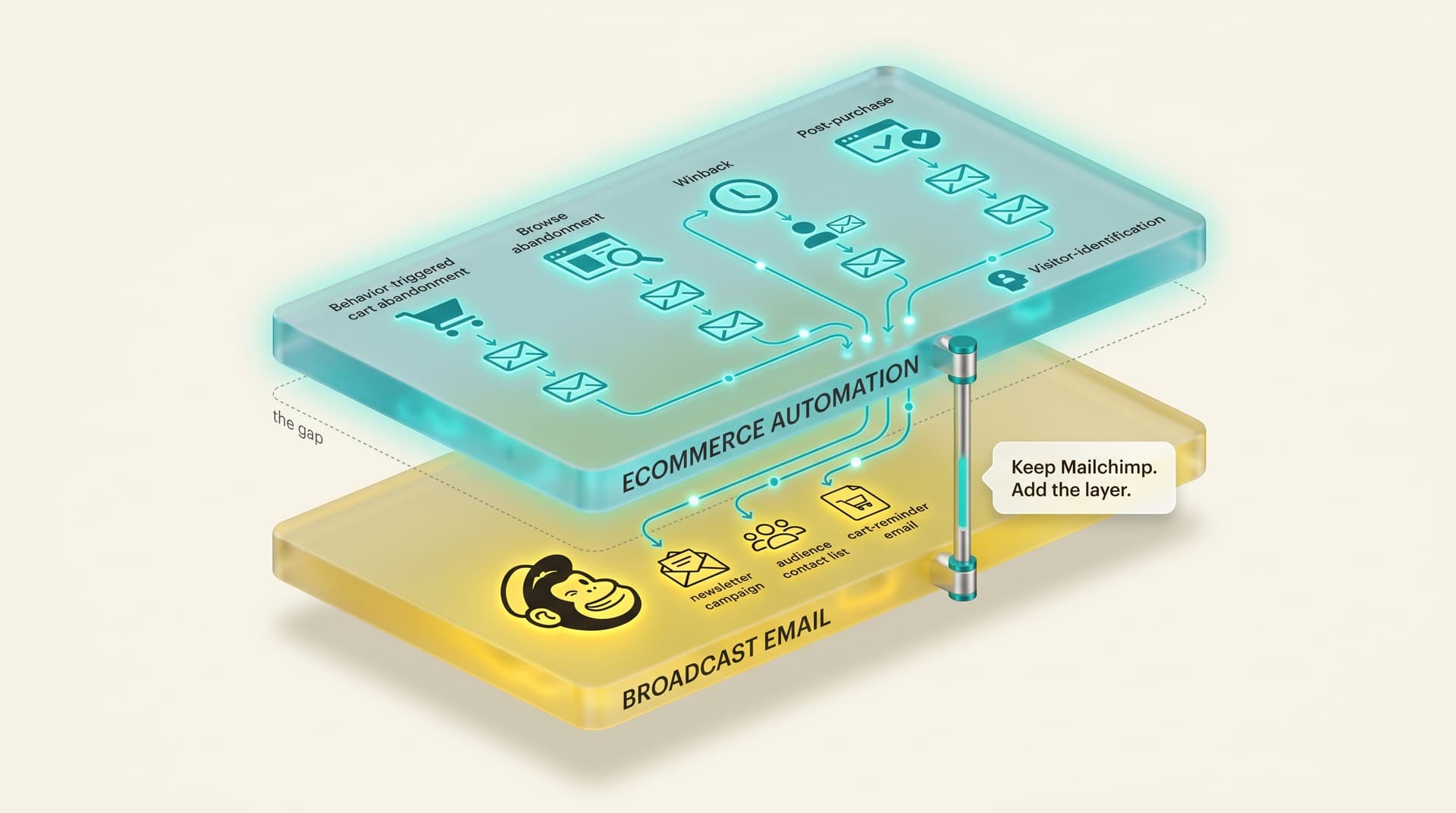
The alternative is the architecture this whole series is built on, and the one we lay out in depth in The Modern Ecommerce Email Stack: keep the tool that does broadcast well, and add a second tool that does behavior. Mailchimp stays your newsletter and campaign platform. An automation layer sits on top of WooCommerce and runs the behavioral flows Mailchimp cannot, including for the anonymous traffic that never makes it onto the list, and feeds what it learns back so your audience gets richer rather than thinner.
Katie Keith, co-founder and CEO of Barn2 Plugins, whose products run on more than 100,000 WooCommerce stores, built Barn2 by solving specific problems such as quick ordering, product filtering and content protection. WooCommerce stores grow the same way, by adding focused tools for the jobs the core platform and the big generalist plugins do not do well. Email is the same. You do not have to replace the generalist to add the specialist.
This is the same play we mapped for the SendGrid cohort in WooCommerce + SendGrid and the HubSpot cohort in WooCommerce + HubSpot. Different starting tool, same gap, same fix.
| Capability | Mailchimp for WooCommerce | With an automation layer added |
|---|---|---|
| Broadcast newsletters and campaigns | Strong — this is what it is for | Stays in Mailchimp |
| Basic templated cart email | Yes, single templated reminder | Real-time, multi-step, branch-tuned cart sequence |
| Browse abandonment | Not really | On-site, product-level browse flows |
| Winback and post-purchase | Generic broadcast to a lapsed segment | Behavior- and product-tied sequences |
| Anonymous paid traffic | Invisible — list contacts only | Recovered via visitor identification |
| Backend performance | Heavy off-site sync on big stores | Behavior captured on-site, not synced out wholesale |
Mailchimp for WooCommerce is strong at broadcast newsletters and campaigns and adequate at a single templated cart email, but it does not run real-time multi-step cart sequences, on-site browse abandonment, behavior-tied winback, or recovery of the 80-95% of paid traffic that never subscribes. Adding a dedicated automation layer keeps Mailchimp for what it does well and supplies the behavioral ecommerce flows it was never built to run.
Switch, stay, or add a layer?
The right move depends on how far past broadcast your store has grown. This table maps the common cases.
| Your situation | Recommendation | Why |
|---|---|---|
| New or small store, newsletter is the main need | Stay on Mailchimp | Broadcast is what it does well; do not over-build before you have the traffic |
| Growing store, cart and browse revenue is leaking | Keep Mailchimp, add an automation layer | Behavioral flows are the gap; the newsletter is not the problem |
| $5K+/mo in paid Meta and Google, lots of anonymous traffic | Add an automation layer with visitor identification | Mailchimp only emails list contacts; the layer recovers the paid traffic it never sees |
| Backend is slow from the Mailchimp sync on a big catalog | Add a layer that captures behavior on-site | Less reliance on a heavy off-site sync for the flows that matter |
| You want one dedicated ecommerce ESP and will run the migration | Consider Klaviyo or Omnisend | A real option if you are ready to replace the newsletter too, not just add to it |
| Team is small and already lives in Mailchimp | Keep Mailchimp, add a layer | No retraining; you add capability without changing the daily tool |
For most growing WooCommerce stores, adding an automation layer beats migrating off Mailchimp, because the newsletter and campaign side already works and the gap is purely the behavioral flows. A full migration to a dedicated ecommerce ESP like Klaviyo only makes sense for stores ready to replace broadcast email entirely, not just add the missing automation tier.
What this looks like on WooCommerce
In practice, the layer-on-top setup for a Mailchimp store works like this.
WooCommerce stays the storefront and the source of truth for behavior. Mailchimp stays connected for newsletters, campaigns, and the audience you have already built. The automation layer installs alongside them and reads store behavior directly and in real time: carts, product views, purchases, even from visitors who have not subscribed. It runs the flows Mailchimp cannot (a tuned cart sequence, browse abandonment, post-purchase, and winback), and when a previously anonymous visitor identifies, that profile can flow into your Mailchimp audience so your list grows with real buyers instead of staying capped at the people who already opted in.
You keep sending your newsletter from the tool you know. You stop asking that tool to be an ecommerce engine. And you do it without a migration, without retraining the team, and without paying Mailchimp's per-contact pricing for contacts that were never going to open a broadcast anyway. The full architecture and the four-ESP picture this fits into are laid out in the WooCommerce email marketing 2026 pillar.
I have a soft spot for Mailchimp, because it is how a lot of us learned email in the first place. That is also the trap. The store grows, the revenue moves into flows Mailchimp was never built to run, and the easy answer feels like ripping it out and starting over on a tool that promises to do everything. Most of the time that is a six-month project to solve a problem that did not require it. Keep the newsletter where it works. Add the behavior layer on top. The stores that win are not the ones with the fanciest single tool. They are the ones that stopped asking one tool to do two jobs.
— Bob Thordarson, Geysera CEO
Frequently asked questions
What are the disadvantages of Mailchimp for WooCommerce?
The main disadvantages are shallow ecommerce automation and operational drag. Cart recovery is a single templated email rather than a tuned multi-step flow, browse abandonment is effectively absent, and winback is a broadcast to a segment. On the practical side, the sync can slow the WordPress backend on large stores, and the free 500-contact cap fills quickly because non-subscribed contacts also count.
Is Mailchimp good for ecommerce?
Mailchimp is good for broadcast newsletters and basic campaigns, which is part of ecommerce but not the part that drives the most revenue. It is weaker at the behavioral flows (real-time cart recovery, browse abandonment, behavior-tied winback) that dedicated ecommerce tools handle. For a small store sending newsletters it is fine; for a store leaking cart and browse revenue, it needs help.
Is Mailchimp for WooCommerce free?
There is a free tier, capped at 500 contacts. The catch on WooCommerce is that both subscribed and non-subscribed synced contacts count toward that cap, so connecting a store with an existing customer base can push you onto a paid plan quickly. Mailchimp's paid plans are priced on total contacts, not on email revenue, which is a poor fit for a store with many one-time buyers.
Does Mailchimp slow down WooCommerce?
It can, on large or busy stores. Mailchimp publishes its own guidance on managing WooCommerce syncs to improve performance, and slow-backend reports are common in WordPress.org support threads. The cause is the constant off-site push of customer, order, and product data. Capturing behavior on-site with a dedicated layer reduces how much you lean on that heavy sync.
Can Mailchimp do abandoned cart emails for WooCommerce?
Yes, but at a basic level. The plugin can send a templated abandoned-cart email to known contacts. It does not run a real-time, multi-step, branch-tuned cart sequence, and it does not recover carts from anonymous visitors who never subscribed. Cart abandonment runs near 70% in 2026, so the difference between one templated reminder and a tuned sequence is most of the recoverable revenue.
Why are people leaving Mailchimp for WooCommerce?
Two reasons usually. Pricing, because per-contact billing punishes stores with large lists of one-time buyers, and capability, because the ecommerce flows that drive repeat revenue are shallow compared with dedicated tools. Many stores do not actually need to leave, though. Keeping Mailchimp for newsletters and adding an automation layer for the behavioral flows solves the capability gap without a migration.
Should I switch from Mailchimp to Klaviyo for my WooCommerce store?
Only if you are ready to replace broadcast email entirely, not just add the missing automation. Klaviyo is a stronger ecommerce engine, but switching is a migration project that throws away the newsletter setup that already works. A common middle path is to keep Mailchimp for campaigns and add an automation layer for cart, browse, winback, and visitor identification.
What is a WooCommerce automation layer, and how is it different from Mailchimp?
An automation layer is a tool that sits on top of your store and runs behavioral ecommerce flows (cart, browse, post-purchase, winback) in real time, including for anonymous visitors, then feeds what it learns back to your email list. Mailchimp is a broadcast newsletter platform with ecommerce features bolted on. The layer is an ecommerce engine. They do different jobs and work well together.
Continue the series
This is post 6 of 17 in the WooCommerce Email Marketing in 2026 series.
- Start with the pillar: WooCommerce email marketing 2026 — the complete stack
- Previous in series: WooCommerce + HubSpot 2026 — closing the ecommerce automation gap
- Next in series: Klaviyo for WooCommerce: The Visitor-ID Gap and How to Close It — the Klaviyo cohort post: why its excellent flows only reach identified visitors, and how to close the gap.
- The architecture behind this post: The Modern Ecommerce Email Stack: Why Two Tools Beat One
If you want the WooCommerce-specific automation layer that sits on top of whichever ESP you already run, Mailchimp included, that is what Geysera is built for.
Sources
- Troubleshoot Mailchimp for WooCommerce — Mailchimp Help
- Manage Syncs from a WooCommerce Store — Mailchimp Help
- Connect or Disconnect Mailchimp for WooCommerce — Mailchimp Help
- Mailchimp for WooCommerce — WooCommerce.com plugin listing (3.7/5, 59 reviews)
- Mailchimp for WooCommerce making backend very slow — WordPress.org support
- WooCommerce scalability: how to scale your WooCommerce store — Saucal (Matias Saggiorato)
- Co-Founder & CEO of Barn2, Katie Keith — WP Legends, Seahawk Media
- CRM Insights and the Future of WordPress with Adrian Tobey — Do the Woo
- Cart abandonment statistics 2026 — Statista

Co-Founder and CEO
Bob Thordarson is CEO and Co-Founder of Geysera, a serial entrepreneur with 25+ years and five co-founded ventures, including Cequint (acquired by TNS in 2010 for $112.5M) and Consumerware (acquired by ParkerVision). A graduate of the University of Washington and MIT Entrepreneurial Masters Program, based in Seattle, he serves on the boards of DRY Soda Co. and the Entrepreneurs' Organization Seattle chapter. He is an expert in retention marketing email systems and methodology for ecommerce and B2B brands — measured by incremental revenue, not vanity metrics.