Website Visitor Tracking: How to See Who Visits Your Website
Website visitor tracking means four different things: analytics that records what visitors do, company-level tools that name the employer behind an IP address, person-level tools that name individuals in the US, and forms that name the few who tell you. This guide takes each layer in turn, with what it shows, how much of your traffic it reaches according to published vendor figures, where it stops, and the order to set them up so each step tells you whether the next is worth paying for.

Website visitor tracking is the collection of data about the people who visit a website: which pages they view, where they came from, what device they use and how long they stay. Standard analytics stops at behavior. Naming the company or the person behind a visit takes a separate identification tool layered on top.
Before writing this, I ran the connection I'm writing it on through ipinfo.io's free lookup, which is the same reverse-IP step every company-level tracking tool starts from. It came back as Comcast Cable Communications in Washington, with no trace of Geysera. If I'd opened your website at that moment, that's the most a company-level tool could have told you about me, and Google Analytics wouldn't have told you even that much.
KEY STATS
- Around 98% of website visitors are anonymous on arrival, a share that includes customers who are logged out (Twilio Segment, 2026)
- Marketers surveyed by 6sense, an account-based marketing vendor, reported that only about 3% of their website visitors fill out a form (6sense, 2022)
- Google Analytics 4 does not log or store visitor IP addresses, and Google's policies forbid sending it any data Google could recognize as personally identifiable information (Google Analytics Help, 2026)
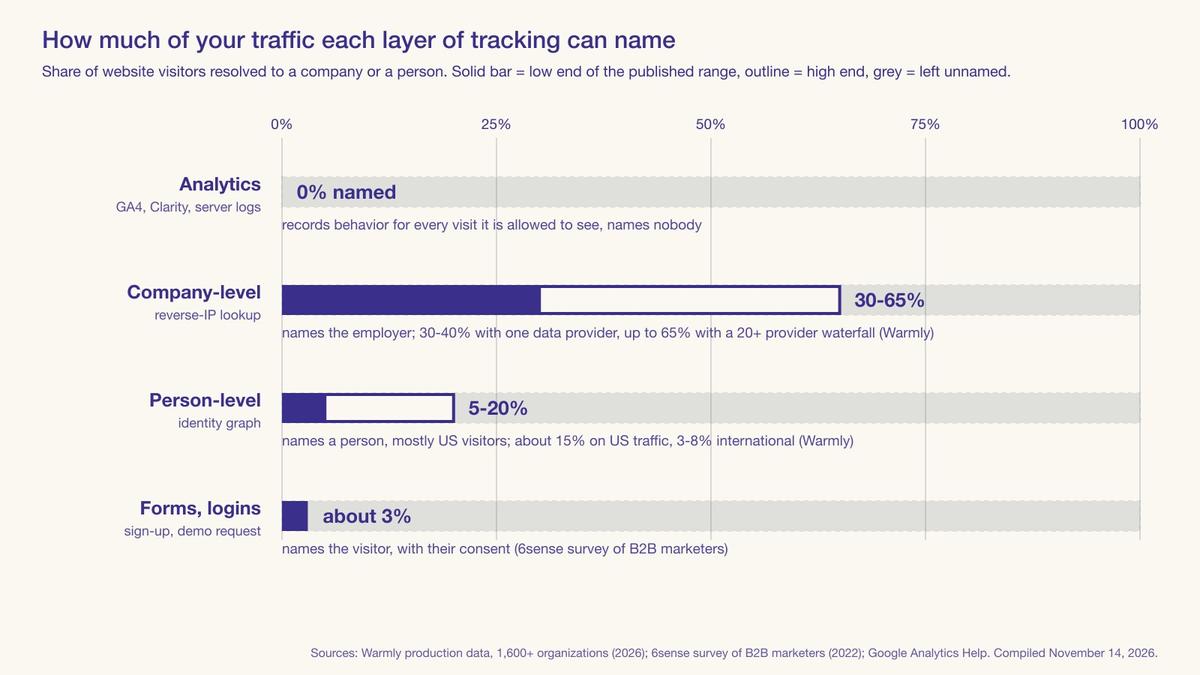
- Company-level identification resolves 30-65% of website traffic across Warmly's 1,600+ customer organizations, on a tool that queries 20+ data providers in turn, while Warmly puts single-provider tools at 30-40% (Warmly, 2026)
- Person-level identification names an individual for 5-20% of website traffic across Warmly's customers, averaging about 15% on US traffic and 3-8% on international traffic (Warmly, 2026)
- RB2B's pricing page lists 15-20% company-level coverage on its free plan, a figure RB2B publishes about its own product (RB2B, November 2026)
- Microsoft Clarity records sessions and heatmaps for free, with no traffic limit and no paid tier (Microsoft, 2026)
- Data sourced from vendor production data and pricing pages, Google and Microsoft product documentation, and a 6sense survey, checked November 2026
What's in this guide:
- The four layers of website visitor tracking
- Layer 1: analytics shows what happened, not who
- Layer 2: company-level tracking names the employer
- Layer 3: person-level tracking names a person, mostly in the US
- Layer 4: forms and logins are the only certain names
- How to see who visits your website, in order
- Can website owners see who visits their website?
- Where Signal fits, and where it doesn't
- Frequently asked questions
The four layers of website visitor tracking
"Website visitor tracking" gets used for four different jobs, and each layer below names fewer of your visitors than the one before it. For most small B2B teams the practical answer is GA4 plus Microsoft Clarity plus a free company-level tool, with person-level identification tested only if most of your traffic is in the US.
| Layer | Example tools | What you see | What you don't see | Share of traffic it covers |
|---|---|---|---|---|
| 1. Analytics and behavior | Google Analytics 4, Microsoft Clarity, Hotjar, your server logs | Pages, traffic source, device, country, session recordings | Who anyone is | Every visit that loads the script and isn't blocked or declined |
| 2. Company-level identification | Leadfeeder (Dealfront), RB2B's free plan, Snitcher | The employer's name, industry and size | The person, and most visitors on a home or mobile connection | 15-20% on RB2B's free plan, by RB2B's own figure; 30-65% across Warmly's customers, with single-provider tools at 30-40%, per Warmly |
| 3. Person-level identification | RB2B, Warmly, Signal (ours) | A name, a work email, a LinkedIn profile | Most visitors outside the US, and anyone the identity graph hasn't seen | 5-20% across Warmly's customers, about 15% on their US traffic |
| 4. Forms and logins | HubSpot forms, your own sign-up and checkout | Exactly who, with their permission | Everyone who doesn't fill one in | About 3% of visitors, as reported by marketers in a 6sense survey |
The takeaway: Analytics records nearly every visit and names nobody. In Warmly's data from 1,600+ organizations, company-level identification names an employer for 30-65% of traffic, or 30-40% with a single data provider, and person-level identification names 5-20%. Forms name about 3% of visitors, as reported by marketers in a 6sense survey.
If you already know you want names and you're comparing vendors, the website visitor identification tools comparison is the better starting point.
Layer 1: analytics shows what happened, not who
Google Analytics 4 is where most people start, and it tells you what happened on the site: page views, the source of each session, device and browser, a country and city estimate, and conversion paths. It won't give you a name, and Google designed it to leave names out.
Google's policy bars sending Analytics anything Google could use to identify a person, and its help pages say GA4 doesn't log or store IP addresses at all. I re-read both pages for this post. So the one field a company-level tool needs never reaches your GA4 reports. Standard properties keep user-level data for either 2 or 14 months, which caps how far back you can look even at the behavior.
"IP addresses aren't stored or logged anywhere in GA (it's impossible to get IP address information from GA4's collected data), but they are used temporarily for geolocation." — Samantha Barnes, Senior Director of Google Innovation, Bounteous (Bounteous)
Microsoft Clarity records sessions and draws heatmaps, which shows you where people hesitate on a pricing page or abandon a demo form, and Microsoft's FAQ, which I checked on November 14, says it's free forever with no traffic limits. Install it before any identification tool, because it tells you which pages deserve a name at all. Hotjar does similar work with paid tiers on top.
Your web server does keep raw IP addresses. Apache's default access log format records the remote host, the time, the request line and the response status for every hit. That's the raw material for a reverse-IP lookup.
In the EU and UK, analytics cookies generally need consent before they fire, and a visitor who declines doesn't appear in the reports. Ad blockers often have the same effect anywhere, so the reports usually undercount what arrived.
Layer 2: company-level tracking names the employer
Company-level tools take a visitor's IP address and look it up against registries of which organization owns which address block. When someone visits from an office network with a static, registered range, the lookup returns the employer: name, domain, industry, headcount. Leadfeeder, which now sits under the Dealfront brand, has offered this for years, and RB2B's free plan and Snitcher both start at this layer.
The method breaks on exactly the connection I opened this post with. A remote worker on home broadband usually resolves to Comcast, or Verizon, or whichever ISP owns the line, and a phone on cellular data resolves to the carrier. Warmly sells a competing person-level tool, and it reports company-level identification at 30-65% of traffic across more than 9 million visits a month. Its tool queries 20+ data providers in turn, and Warmly puts single-provider tools at 30-40%. RB2B, which Warmly counts as single-provider, publishes 15-20% company-level coverage for its own free plan. Sites whose visitors mostly sit in offices likely land near the top of those ranges.
"This won't identify small businesses on a standard Comcast or Verizon Business account. You'll see the ISP name, not the company." — Kevin Leary, Fractional CTO and tech lead, Kevinleary.net (Kevinleary.net)
You can see that three people from one target account read your pricing page this week and route that to the account owner. It won't tell you which of the three to email. Person-level vs company-level identification goes through what each level supports in practice.
Layer 3: person-level tracking names a person, mostly in the US
Person-level tools skip the IP registry and match the visitor against an identity graph, a large and continuously updated set of claims connecting cookies, devices, hashed emails and IP addresses to named people. When the visitor's browser or device has been seen somewhere the graph can see, the tool returns a name, a work email and usually a LinkedIn profile. What is an identity graph? explains how those claims get built and why some of them are wrong.
Across its customers, Warmly puts person-level identification at 5-20%, averaging about 15% on US traffic and 3-8% on international traffic. Many person-level vendors don't try abroad at all. When I checked RB2B's pricing page on November 14, its contact-level row was labelled "US Only." The likely reason is European privacy law, which treats an identified person as personal data from the first lookup. Vendor pages publish figures far above that, and the match-rate breakdown shows why one product can be quoted at four different rates at once.
On a site with 2,000 US visitors a month, Warmly's 15% US average works out to about 300 identified people, which is probably enough to tell you within a month whether the names change anything for your sales team.
Layer 4: forms and logins are the only certain names
A form fill, a demo request, a free-trial sign-up or a checkout is the one point where the visitor tells you who they are and agrees to it. The name is as accurate as what they typed, and the data is yours to use within whatever consent you collected. But marketers surveyed by 6sense, which sells account-based marketing software, reported that only about 3% of their website visitors fill out a form.
How to see who visits your website, in order
- Check what your analytics already shows. Open GA4's traffic acquisition and pages reports for the last 90 days. If fewer than a few hundred people a month reach your pricing or product pages, identification tools will likely have little to identify.
- Add session recordings. Install Microsoft Clarity alongside GA4. It's free, and a week of recordings on your two or three highest-intent pages usually shows what visitors do before they leave.
- Look at your server logs, if you can get them. A self-managed host or a content delivery network such as Cloudflare usually keeps access logs with raw IP addresses, while many hosted website builders don't expose them, in which case skip to step 4. A quick look usually tells you how much of your traffic comes from corporate ranges rather than consumer ISPs, which predicts how well layer 2 will work for you.
- Try company-level identification on a free tier. RB2B and Leadfeeder both had free plans that name companies when I checked their pricing pages on November 14, 2026. Leadfeeder's free Lite plan caps you at the last 100 companies a month. Run one for 30 days and count how many named companies match your ideal customer profile.
- Decide whether person-level is worth it. It's worth testing if most of your traffic is in the US and a named contact would change what your sales team does next. Run your own audit during a trial, on the plan you'd buy, using the steps in the match-rate breakdown, rather than trusting the vendor's dashboard number.
- Settle consent before you scale. Update your privacy notice and cookie banner for whichever layers you've installed. In California, business-contact data has carried full CCPA rights since the exemption for it expired on January 1, 2023, according to the IAPP. Treat a named visitor as personal data, as our post on US privacy law explains. Before you email anyone a tool has named, read the complete guide.
Steps 1 to 4 cost nothing. How to identify anonymous website visitors compares all five identification methods in more depth.
Can website owners see who visits their website?
Partly. Any website owner can see your IP address, browser, device, operating system, approximate location, the page that referred you and every page you viewed, because your browser sends most of that with each request. They can't see your name unless you give it to them in a form or login, or unless they run an identification tool that resolves you.
In the US that second route is real. If your work identity has been seen by an identity graph, a site running a person-level tool may know your name and work email within seconds of your visit. On a home connection without that history, the most a site usually learns is your ISP and your city. A VPN defeats IP-based company lookups but not cookie or device matching, and blocking third-party scripts stops most identification pixels from loading.
Where Signal fits, and where it doesn't
If you need layer 2 only, and especially if most of your traffic is outside the US, a company-level tool on a free plan is the right buy, and you don't need us.
If you want named US visitors, that's what we built Signal for. It collects first-party signals on your own domain and queries a third-party identity graph only to resolve visitors already on your site, returning company and person details for US visitors. Every account starts with a 7-day trial of Pro+, our top self-serve plan, for $1, then keeps a plan or drops to Free at 150 identified visitors a month. On annual billing, Starter is $69 a month for 300, Pro is $129 for 1,000 and Pro+ is $169 for 2,500. Every plan, Free included, pushes contacts natively to HubSpot, Klaviyo and Mailchimp, sends hourly Slack and Microsoft Teams alerts (in beta), and exports CSV.
We don't publish a person-level match rate for Signal's B2B identification, which means you can't compare us on the one number every competitor leads with, and you'll have to run the audit above on your own traffic to learn what we resolve. Every Signal plan uses the same matching, so the rate you measure during the Pro+ trial carries over, though lower plans cap how many identified visitors you receive each month. And we don't have a native Salesforce integration yet, so a Salesforce shop is better served by a tool that does.
We had a coverage number on our own pricing page until October. "Premium coverage (35–45% vs 15–20% baseline)" sat on the Pro+ tier, and while checking it for a comparison post I found those were the same two bands RB2B prints on its pricing page. We hadn't measured either band on customer traffic, so we took the line down. Losing it costs us in every side-by-side comparison, and we'll put a number back only after a customer test produces one we can show the working for. — Bob Thordarson, Geysera CEO
Frequently asked questions
What is website visitor tracking?
Website visitor tracking is the collection of data about who visits a website and what they do there. At its simplest it means analytics such as Google Analytics 4, which records pages, sources and devices but no names. Deeper layers add company-level identification, which names the employer behind an IP address, and person-level identification, which names individuals, mostly in the United States.
Can website owners see who visits their website?
Website owners can see a visitor's IP address, device, browser, approximate location, referring page and the pages they viewed. They can't see a name unless the visitor fills in a form or logs in, or the site runs an identification tool. In Warmly's data from 1,600+ customer organizations, person-level identification names roughly 5-20% of visitors, mostly in the United States.
Does Google Analytics show who visited my website?
No. Google Analytics 4 shows what visitors did, not who they were. Google's policies forbid sending Analytics any personally identifiable information, and GA4 doesn't log or store IP addresses, so it can't name a company or a person. It reports pages, traffic sources, devices, locations and conversions, and keeps user-level data for 2 or 14 months on a standard property.
How can I see who visited my website for free?
Start with Google Analytics 4 and Microsoft Clarity, which are both free and show what visitors did. For company names, RB2B and Leadfeeder offer free plans that identify the employer behind some visits. RB2B lists 15-20% company-level coverage on its free plan, and Leadfeeder's free plan shows the last 100 companies a month. Person-level identification usually needs a paid plan, though some vendors offer small free tiers.
How accurate is website visitor tracking?
Most published figures measure coverage, the share of visitors named, not whether the names are right. Company-level identification covers 30-65% of traffic across Warmly's customers and 30-40% with a single provider, and person-level covers 5-20%. Correctness is rarely published, so test a sample yourself. Form fills reach only about 3% of visitors, per a 6sense survey, but carry the name the visitor typed.
What is the difference between website visitor tracking and visitor identification?
Visitor tracking records what visitors do: pages, sources, sessions and conversions. Visitor identification attaches a name to a visit, either a company resolved from an IP address or a person resolved through an identity graph. Every identification tool also tracks, but most tracking tools, including Google Analytics 4 and Microsoft Clarity, never identify anyone, by design.
Continue the Series
This is Post 14 in Geysera's 19-part series on B2B anonymous visitor identification. The posts published so far:
- Post 1 — Anonymous website visitor identification: the complete 2026 guide (pillar)
- Post 2 — How to identify anonymous website visitors: 5 methods and what each delivers
- Post 3 — What is an identity graph? How anonymous visitors get matched to real people
- Post 4 — Match rates decoded: why 40%+ person-level claims are usually fiction
- Post 5 — B2B intent data explained, and why most of it is flawed
- Post 6 — Person-level vs company-level identification
- Post 7 — The best website visitor identification tools (2026)
- Post 8 — Third-party cookies didn't die, the deprecation did
- Post 9 — Lead routing for identified website visitors
- Post 10 — Is an IP address PII? What US privacy law means for identifying website visitors
Sources
- Twilio Segment — Identity resolution: what it is and how it works
- 6sense — Only 3% of web visitors fill out forms
- Warmly — Website visitor identification match rates: what every vendor won't tell you
- Google Analytics Help — Best practices to avoid sending personally identifiable information
- Google Analytics Help — IP masking in Google Analytics
- Google Analytics Help — Data retention
- Microsoft Clarity — Frequently asked questions
- Apache HTTP Server 2.4 — Log files
- RB2B — Pricing
- Leadfeeder — Pricing
- Geysera — Signal pricing
- Bounteous — IP addresses and Google Analytics 4: what you should know (Samantha Barnes)
- Kevinleary.net — Web visitor company identification (Kevin Leary)
- ipinfo.io — IP address lookup

Co-Founder and CEO
Bob Thordarson is CEO and Co-Founder of Geysera, a serial entrepreneur with 25+ years and five co-founded ventures, including Cequint (acquired by TNS in 2010 for $112.5M) and Consumerware (acquired by ParkerVision). A graduate of the University of Washington and MIT Entrepreneurial Masters Program, based in Seattle, he serves on the boards of DRY Soda Co. and the Entrepreneurs' Organization Seattle chapter. He is an expert in retention marketing email systems and methodology for ecommerce and B2B brands — measured by incremental revenue, not vanity metrics.