Lead Routing for Identified Website Visitors: From Identified to Pipeline
Identifying a website visitor produces a name, a work email and a page path. What the CRM does with that record in the next sixty seconds decides whether anyone ever acts on it. This guide sets out the five routing decisions in the order they have to run: confidence, buyer-versus-candidate, match before create, owner assignment, and create with the owner already set, with the HubSpot, Salesforce and Bullhorn mechanics for each.

Lead routing is the set of rules that decides which record a new prospect becomes in your CRM and which person owns it from the moment it is created. For an identified website visitor the inputs are a name, a work email and a page path rather than a form, so the rules have to run in a different order.
Picture the failure this guide is about. A visitor-identification tool resolves someone from a target account at 9:14 on a Tuesday. It creates a contact in HubSpot, posts a card to a Slack channel with forty other cards in it, and leaves the owner field blank. The account's rep never sees it, because she doesn't read that channel and the contact isn't hers. On Friday a round-robin workflow assigns it to a new SDR, who emails a person his colleague has been working for six months. No integration failed at any step. The rotation ran because it was configured to run on unowned contacts, and the contact was unowned because nothing set the field at 9:14.
KEY STATS
- Around 98% of website visitors arrive anonymous, so routing rules written for form fills never see most of the traffic an identification tool produces (Twilio Segment, 2026)
- About 3% of B2B website visitors go on to fill in a form, and that 3% is the only population most CRM routing was designed for (6sense, 2022)
- HubSpot keys contact deduplication on 1 property, Email: an import or API create carrying an existing email updates that record instead of creating a 2nd one (HubSpot Knowledge Base)
- Salesforce assignment rules evaluate entries in order, assign on the first match, and accept up to 25 filter criteria per entry (Salesforce Help)
- Bullhorn's REST API models 4 separate records, Candidate, ClientContact, ClientCorporation and Lead, and a Lead can be converted into any of the other 3 (Bullhorn REST API reference)
- An audit of 2,241 US companies found 37% responded to a web lead within an hour, 23% never responded, and the average response among companies that replied within a month was 42 hours (Harvard Business Review, 2011)
- B2B contact data decays by 22.5% to 30% a year as people change jobs and companies restructure (HubSpot/MarketingSherpa; ZoomInfo)
- Data compiled from HubSpot, Salesforce and Bullhorn documentation, Harvard Business Review, Twilio Segment and 6sense, September 2026
What's in this guide:
- What lead routing means when nobody filled in a form
- Why the owner field matters more than the alert
- The five decisions, in order
- Start with confidence, not with speed
- Split buyers from candidates before you create anything
- Match before you create
- Assign an owner in a fixed order
- Create the record with the owner already set
- Which object the record should become
- What identification vendors do on an existing record
- Feed the CRM, and stop there
- Frequently asked questions
What lead routing means when nobody filled in a form
Every organic result on the first page of Google for lead routing, seven of them when we pulled the SERP on 9 September 2026, is written about leads that arrived through a form or another inbound channel. That's a reasonable place to start when the form is the only way a stranger becomes a record. It's the wrong place to start for the population this series is about, because around 98% of visitors arrive anonymous, about 3% of B2B visitors ever fill in a form, and identification exists precisely to produce records for the rest.
A form fill hands you self-declared data: the person chose their company name, typed their own email, and picked a reason from your dropdown. An identified visitor hands you none of that. What you have instead is a resolved identity with a confidence attached to it, a page path, and a work email that came from a graph rather than from the person. The identity graph post explains why the same visitor can arrive as a deterministic match one day and a probabilistic one the next.
So three questions a form-based routing flow never has to ask sit at the front of this one. How sure are we this is the person? Is this person a buyer at all, or a job-seeker reading our careers page? And, since nobody asked them to fill anything in, are they already in the CRM under someone else's name? Only after those three are answered does the familiar work of picking an owner begin.
Everything below is that reordering, applied to HubSpot, Salesforce and Bullhorn in turn. Skip it and two failures follow. A confidently identified job-seeker gets routed to your best rep, and a new owner gets written onto an account that already had one.
Why the owner field matters more than the alert
Identification tools, ours included, generally ship a Slack or Teams alert as the default output. It looks like activation. Very often it's where the work stops, because an alert in a shared channel has no owner, no task, and no place in anybody's pipeline view. The record that lands with the owner field populated does.
Some of the best evidence on what happens to leads nobody owns is older than the identification category. In 2011, James B. Oldroyd, Kristina McElheran and David Elkington published an audit in Harvard Business Review of 2,241 US companies, each sent a test lead through its own website. Thirty-seven percent responded within an hour. Twenty-three percent never responded at all, and among the companies that did respond inside a month, the average wait was 42 hours. Firms that made contact inside the first hour were nearly seven times as likely to qualify the lead as firms that waited even one hour longer. The authors put the delay down to routing, to leads being retrieved from the CRM daily rather than continuously, and to rules for distributing them among reps based on geography and fairness.
A round-robin is fair to reps. The buyer doesn't care whose turn it is, and the account may already have an owner who knows the buyer's name. The mechanics below exist to keep fairness in its place, as the last fallback and not the first rule.
The owner field also matters for a reason unrelated to speed, which is decay. Contact data goes stale at roughly 22.5% to 30% a year as people change jobs. A record that sits unowned for a quarter has probably lost six to eight percent of its accuracy before anyone opens it. Owned on day one, it gets worked before that decay lands.
The five decisions, in order
Five decisions sit between an identified visitor and a record somebody will work. The order matters more than any individual rule. Pick an owner before you check for an existing record and you will overwrite the owner that record already had.
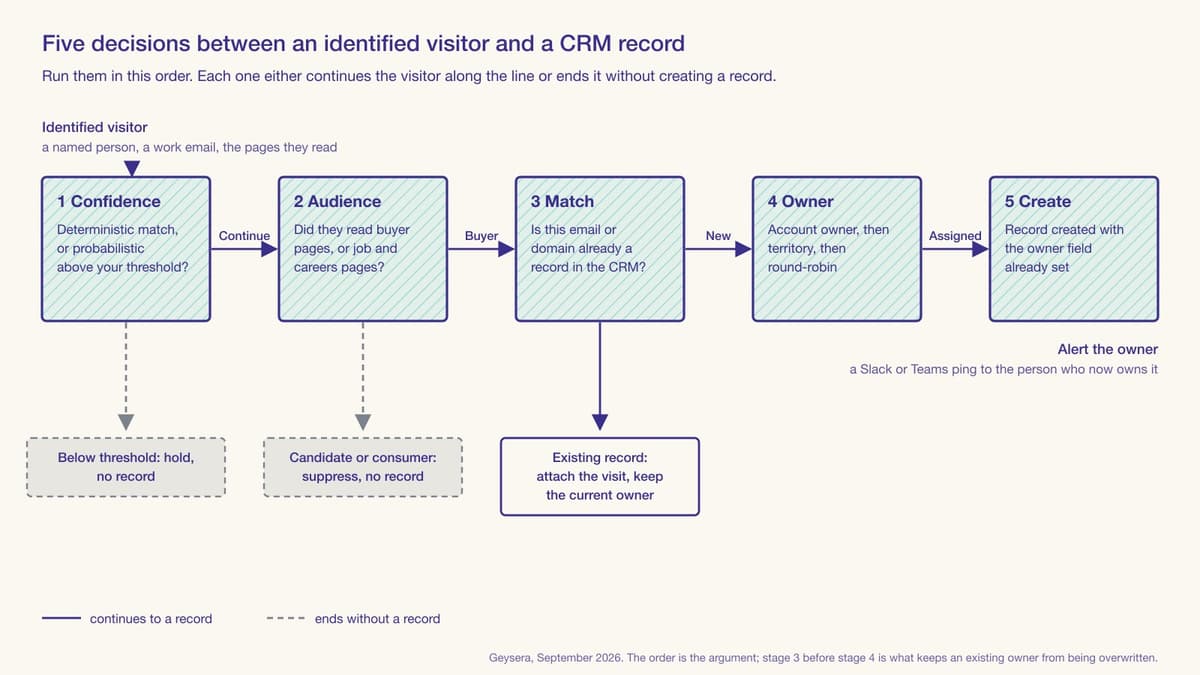
In words, and in the order the figure runs: first ask how confident the identification is, and hold anything below your threshold instead of dropping it. Second, ask which audience the visitor belongs to from the pages they read, and suppress candidates and consumer identities before a record exists. Third, look for the email or the domain in the CRM, and if it's already there, attach the visit to the existing record and leave its owner alone. Fourth, for a person new to the CRM, pick an owner by a fixed ladder: account owner first, territory second, round-robin last. Fifth, create the record with that owner already written into it, and send the alert to the owner, not to a channel.
Two of the five can end without any record being created, and a third attaches to a record that already exists. That is deliberate. A routing flow that creates a new record for every resolved identity is optimising for the count the vendor reports, not for the pipeline the rep works. The sections below take each decision in turn.
Start with confidence, not with speed
Speed-to-lead advice always assumes the lead is real. For an identified visitor, that's the first thing in doubt. As the match-rate post sets out, published person-level rates run from about 15% to 55% across vendors, and the resolution behind any single record is either deterministic, meaning the person handed over a stable identifier at some point the graph could see, or probabilistic, meaning it was inferred from device, network and timing signals with a score attached.
Route the two differently. Deterministic goes straight through to the next decision. A probabilistic one should clear a threshold you set, and the threshold must be yours rather than the vendor's default, because the cost of a wrong record is yours too. There's no universal number, because the right threshold depends on how much corroborating signal your own traffic carries, and that varies by site.
What happens below the threshold matters as much as the threshold. Never drop the visitor. Hold it, with its score. Let a return visit or an email click raise it. Dropping it means a return visit next month starts from zero. Holding it means the second visit adds to the first. The person-level versus company-level post covers the related case where you have a confident company and no confident person, which usually routes to an account-level task rather than a contact.
Split buyers from candidates before you create anything
This decision doesn't arise on most B2B sites, and it decides everything on a site that both sells a service and lists jobs, because that site has two audiences on one domain and identification resolves both of them the same way. Staffing and recruiting agencies are the clearest case: a hiring manager reading the light-industrial services page and a forklift operator reading the same agency's job listings both arrive as a named person with a valid email.
Bullhorn's own automation documentation draws exactly this line. Its website tracking setup asks the agency to flag four kinds of page: Job Views and Apply for candidate behaviour, and Action and Interest for what it calls a sales lead taking a buying action, such as looking at an Our Services or Our Customers page. That is the split, stated by an ATS vendor that reports over 10,000 staffing and recruitment customers. Bullhorn's same document notes that its tracking pixel is attached to Bullhorn Automation emails and a contact becomes eligible for tracking once they open one, which is precisely the gap: it can only classify people it has already emailed. An identification layer has to make the same call for people the agency has never met.
Page-path rules do most of this work, and they belong before any record is created. A visitor whose session is entirely job and application pages is a candidate, and a candidate must never enter the sales pipeline, both because the BD team doesn't want them and because the candidate came to the site for a job, not to buy anything. A visitor who resolves to a consumer identity, a personal Gmail with no company attached, is generally suppressed for the same reason. What's left is, usually, a buyer, and only buyers reach decision three. Post 10 in this series covers the consent side of the tracking layer itself.
One caution from doing this on live traffic is that the split isn't binary for every visitor. A recruiter at a rival agency reads both kinds of page. So do candidates who are also hiring managers, which in staffing is fairly common. Always treat the classifier's output as a routing decision with a confidence of its own, and let a mixed session default to the more conservative outcome, which is suppression.
Match before you create
Every CRM will dedupe for you, and each does it somewhat differently, so the third decision is to know your CRM's rule and run your own check ahead of it.
HubSpot's rule is probably the simplest. Its knowledge base states that when a new contact is added, HubSpot looks for a matching value in the Email property, and if a contact with that email already exists, the incoming data updates the existing record rather than creating a new one. Its developer documentation adds the operational version: always include email, because it's the primary unique identifier for avoiding duplicates, and use the batch upsert endpoint with an idProperty when you want create-or-update behaviour in one call. So in HubSpot the email is the key, and a second record with the same email is very hard to create by accident.
Salesforce separates the two jobs. A matching rule is, in Salesforce's words, an equation that determines how to compare the fields in a pair of records, and it can compare records on the same object or across objects, so a rule can compare leads that duplicate contacts. A duplicate rule then decides what to do about a match: it alerts the rep and lists the possible duplicates, and can be set to block the save. Two details from the conversion documentation matter for identified visitors in particular, and they are probably the least-known part of this. Cross-object duplicate rules aren't triggered during lead conversion, and a lead conversion can't be reversed. Create a Lead for someone who is already a Contact, convert it, and you have a permanent duplicate that the rule designed to catch it never ran on.
Bullhorn's documented deduplication is on the candidate side. Its resume parser updates an existing Candidate when the resume carries an email already in the database, and prompts for review when it finds potential duplicates. We found no equivalent statement for ClientContact or Lead created through the REST API, so on the client side, assume the check is yours to run.
| CRM | What the match runs on | What happens to a match on create | The trap for an identified visitor |
|---|---|---|---|
| HubSpot | Email property, always | Existing contact is updated; no second record | Owner is preserved only if your workflow doesn't overwrite it |
| Salesforce | Matching rules you define, same-object or cross-object | Duplicate rule alerts or blocks, per your setting | Cross-object rules don't run during lead conversion, and conversion can't be undone |
| Bullhorn | Email, documented for Candidate via the resume parser | Existing Candidate updated; review prompt on potential duplicates | No documented check for ClientContact or Lead via the API |
The takeaway: HubSpot keys deduplication on the Email property and updates the existing contact on a match, so the record survives but its owner survives only if no workflow is set to overwrite. Salesforce runs matching rules you define and lets a duplicate rule alert or block. Bullhorn documents email-keyed deduplication for Candidates through its resume parser and nothing equivalent for client-side records created through the REST API, so on that side the check is yours to run before the create call.
The reason this decision must run before owner assignment, and never after, is in the figure. If the person is already a record, they already have an owner, and the correct action is to attach the visit as an activity or timeline event and notify that owner. Any assignment logic that runs first will pick a new owner for a person who had one.
Assign an owner in a fixed order
For the visitors who are new to the CRM, ownership is a ladder, and the rungs are in a fixed order. Account owner first: if the email domain or the resolved company matches an account somebody owns, that person gets the record, whatever the round-robin says. Territory second: if the company is new but falls inside a defined region, industry or size band, the territory's rep gets it. Round-robin comes last, and only for the residue that matched nothing.
"A lead that comes in from Hulu, ESPN, or any other Disney subsidiary should route to whoever owns the Disney parent account, not whoever's next in the round-robin." — Vincent Lee, Senior Technical Marketing Writer, Traction Complete (Lead Routing: 10 Strategies and How to Choose)
That's a routing vendor describing form leads, and it applies with more force to identified visitors, because an identified visitor arrives with a company already resolved. You don't need the person to type "Hulu" into a form to know which parent account they belong to. The domain and the firmographic match are the identification tool's output, so account-based routing is available on the first visit, before any form.
LeanData, another routing vendor, describes the full ladder including the fallback:
"In practice, a lead might first match to an account, then route based on territory ownership, fall back to a round robin pool if the account is unowned, and trigger a time-based SLA that reroutes the lead if no one acts within an hour." — Jill Makin, Content Marketing Specialist, LeanData (Lead Routing Software Guide for B2B Teams)
Both native CRMs can run a version of this, though typically not the whole of it. HubSpot's workflow tool assigns owners through an Edit record action and distributes them through a Rotate record to owner action, which its documentation says will evenly distribute assignment to the specified owners, with the option to assign only unowned records or to overwrite. That second option is precisely the one to switch off for identified visitors; it is how an existing owner gets replaced. Salesforce's lead assignment rules evaluate each entry in order, assign on the first match and stop, with up to 25 filter criteria per entry, and fall back to a default owner when nothing matches. Salesforce allows one active assignment rule per object, so the whole ladder generally has to live in that single ordered list.
Where the native tools typically run out is lead-to-account matching on a domain instead of an exact company name, and any routing across the parent-subsidiary line Lee describes. That's the gap the routing vendors sell into, LeanData's own guide, the one quoted above, draws the line at organisations with 50 or more sellers, multiple territories and overlapping product lines; below that, a well-ordered native rule set usually closes the gap. Buy the routing layer when the ladder no longer fits inside Salesforce's single active rule or a HubSpot workflow.
Create the record with the owner already set
The fifth decision is about timing, and it's what owner-on-create means. The owner is written at the moment of creation, in the same API call, never in a second pass. The reason is what happens in between. A record created unowned sits in a general pool until a workflow, a rotation or a human picks it up. Every one of those runs on a schedule, and the buyer is on a different one. The daily CRM retrieval the HBR authors describe is the same gap, seen from the sales floor.
In practice this generally means the integration creating the record needs the owner ID before it calls the CRM, which means decisions three and four have to have run inside the integration or inside a pre-create step the CRM exposes. HubSpot's contact create accepts the owner property in the same request. Salesforce's assignment rules can fire on create if the request asks for them. Bullhorn's Lead entity carries an assignedTo field, described in its API reference as the corporate users the Lead is assigned to, so a Lead can arrive already owned.
Then, and only then, the alert. Send it to the owner, never to the channel. Vector's Slack documentation describes detecting the owner from the connected CRM and sending the alert directly to them or tagging them in the channel, which is the right shape. A direct message to the owner puts the record in one person's queue. The shared-channel card with forty others around it is what left the 9:14 contact unowned in the opening example.
Which object the record should become
Each of the three CRMs has its own object model, and the object you create decides what the record can become later. The table gives the object for each visitor situation.
| Visitor situation | HubSpot | Salesforce | Bullhorn |
|---|---|---|---|
| New buyer, company not in the CRM | Contact, and a Lead associated to it if you use Sales Hub leads | Lead, converted later to Contact and Account | Lead, converted later to ClientContact under a ClientCorporation |
| New buyer at an account you already own | Contact associated to the existing Company; owner inherited | Contact under the existing Account, not a Lead | ClientContact under the existing ClientCorporation |
| Person already in the CRM | Update the existing Contact; log a timeline event | Activity on the existing Contact or Lead | Note or activity on the existing record |
| Candidate or consumer identity | No record | No record | No record in the sales pipeline; optional Candidate flow if the agency wants it |
The takeaway: HubSpot leads can't exist on their own and must be associated with a contact or company, Salesforce leads convert irreversibly into contacts and accounts, and Bullhorn leads convert into a Candidate, ClientContact or ClientCorporation. The row that costs the most when it goes wrong is the second one: in Salesforce, a new person at an account you already own should never be created as a Lead, because conversion is where duplicates and owner changes happen and it can't be undone.
Two of the definitions matter in the vendor's own words. HubSpot's knowledge base says a lead cannot exist on its own and must have a primary association with a contact or a company, which is why the HubSpot column never has "Lead" alone. Bullhorn's API reference describes a ClientContact as any person at the ClientCorporation whom you wish to track, a hiring manager, HR staffer, executive or other employee, and a Lead as a lead on a potential Candidate, ClientContact or ClientCorporation that can be converted into any of the three. The same reference notes that a Candidate may become a ClientContact after being placed, and a ClientContact may become a Candidate after deciding to look for another position. In staffing the two audiences don't just share a domain; the same person crosses between them, which is one more reason the audience decision has to be re-run on every visit instead of stored once.
What identification vendors do on an existing record
Because the third decision is the one most often skipped, here is what the identification tools themselves say they do when a resolved visitor is already in the CRM. Each vendor's own integration documentation, as it stood in September 2026, is the source for the table, which describes what each tool writes and says nothing about how accurate its identification is.
| Vendor | CRMs documented | On an existing record | Owner handling documented |
|---|---|---|---|
| RB2B | HubSpot, Salesforce | Updates only its own RB2B properties and leaves existing contact data untouched; logs a HubSpot timeline event | Not in the integration article; routing is done in HubSpot or Salesforce workflows |
| Vector | HubSpot, Salesforce | Adds a new activity to the existing contact; creates contact and activity only if none exists | Detects the CRM owner and sends the Slack alert to them |
| Leadfeeder | HubSpot, Salesforce, Pipedrive, Zoho | Sends companies, contacts and activity "without creating duplicates"; company-level identification | Creates deals or tasks for the sales team on intent |
| Factors.ai | HubSpot, Salesforce | Company workflow adds companies; contacts come from Apollo lookups within the identified company | Not documented |
| Geysera Signal | HubSpot, Salesforce, Marketo, plus custom webhooks | Creates or updates the contact; the assignment ladder runs in your CRM's rules or in the webhook consumer | Slack and Teams alerts; owner assignment is the CRM's, not ours |
The takeaway: Of five identification vendors, RB2B and Vector document leaving an existing record's data alone and attaching activity, Vector alone documents routing the alert to the CRM owner, Leadfeeder documents duplicate avoidance at company level, and Factors.ai documents neither an existing-record rule nor owner handling. None of the five documents an assignment engine of its own; each depends on rules that live in HubSpot or Salesforce. The five routing decisions are therefore yours to configure, whichever tool identifies the visitor.
What surprised us was how thin the owner column is. Four of the five tools, ours included, either leave ownership to the CRM or don't document it at all. That's defensible, since the CRM is where the rules should live, but it means the buyer of an identification tool is also, whether they planned it or not, the person who has to design the ladder in the previous two sections.
Feed the CRM, and stop there
Once the visitor is identified and the record exists with an owner, what does the identification layer do next? Our answer is nothing. Signal creates or updates the record in HubSpot, Salesforce or Marketo, or hands the payload to a webhook you own, sends the alert to Slack or Teams, and stops. It doesn't send email, doesn't run sequences, and doesn't hold a second copy of the pipeline. The pillar for this series calls this feed-not-send, and here it is the subject of a whole section.
A team with no sequencing tool gets a record and a ping and has nothing to do with them on day one. A team that wanted one vendor for identification and outreach will often find Apollo or Instantly bundle both, and we don't. Our reason for the trade is in the vendor table above. Every identification tool depends on rules that live in the CRM, so a sender bolted onto the identification layer is a second inbox competing with the one the team already runs. The email cluster later in this series takes up whether to email identified visitors at all.
Signal has no native Bullhorn integration today; a staffing agency routes into Bullhorn through the webhook, which means the buyer-versus-candidate split and the owner ladder run in the consumer of that webhook, not in a packaged connector. And we haven't published a match rate for Signal, and won't until a customer test validates one, which means the confidence threshold in decision one is something you'll set from your own traffic on the free tier rather than from a number on our pricing page. What that tier costs, and how to compare it with tools priced per visitor or per seat, is in what website visitor identification costs.
When we locked Signal's scope we left the sender out, and it would've been the easier sale. Every demo since has had someone ask why we don't just email the person for them. The cost is real: a team with no sequencing tool gets a record and a Slack ping and nothing else on day one. I'd still make the call, because the alternative is a second inbox competing with theirs, and the second inbox is always the one that gets blamed when deliverability slips. — Bob Thordarson, Geysera CEO
If you're a solo operator with no CRM and no sequences, the record-and-alert model is probably heavier than your day needs, and a tool that emails on your behalf may fit better. If you run a team with a CRM that already has owners, territories and a round-robin in it, the five decisions above are what turn an identified visitor into something that appears in a named person's pipeline view inside the hour the visit happened.
Frequently asked questions
What is lead routing?
Lead routing is the set of rules that assigns a new prospect record to a specific sales rep or team, and decides which CRM object it becomes. Native versions exist in HubSpot as workflow owner assignment and rotation, and in Salesforce as lead assignment rules that evaluate entries in order, assign on the first match, and fall back to a default owner when nothing matches.
How is routing an identified website visitor different from routing a form lead?
A form lead arrives with self-declared data and no doubt about whether the person exists. An identified visitor arrives with a confidence score, a page path and an email from a graph, and may already be in your CRM. So three decisions run first: check the confidence, classify the audience, and match against existing records. Only then does owner assignment begin.
Should identified visitors be created as leads or contacts?
It depends on the CRM and on whether the account already exists. In Salesforce, a new person at an account you already own should be a Contact under that Account, because lead conversion is irreversible and cross-object duplicate rules don't run during it. In HubSpot, a lead can't exist alone and must be associated with a contact or company. In Bullhorn, a Lead converts to a ClientContact.
What is owner-on-create?
Owner-on-create means the owner field is written in the same call that creates the record instead of being left blank for a later workflow to fill. It matters because unowned records wait for a rotation or a human on a schedule the buyer isn't on. HubSpot accepts the owner property on create, Salesforce assignment rules can fire on create, and Bullhorn's Lead entity carries an assignedTo field.
How do you stop job-seekers from entering the sales pipeline?
Classify the visitor from the pages they read before creating any record. Bullhorn's own automation documentation separates Job Views and Apply pages from Action and Interest pages, the latter being what it calls a sales lead taking a buying action. A session made entirely of job and application pages is a candidate and is suppressed; a mixed session should default to suppression as well.
Does a round-robin work for identified visitors?
Round-robin belongs at the bottom of the ladder. An identified visitor arrives with a resolved company, so account-based routing is available on the first visit without a form. Route to the account owner first, then by territory, and use round-robin only for visitors whose company matches nothing. Running the round-robin first is how an existing owner gets overwritten on a person their colleague has been working.
Continue the Series
This is Post 9 in Geysera's 13-part series on B2B anonymous visitor identification.
- Post 1 — Anonymous website visitor identification: the complete 2026 guide (pillar)
- Post 2 — How to identify anonymous website visitors: 5 methods and what each delivers
- Post 3 — What is an identity graph? How anonymous visitors get matched to real people
- Post 4 — Match rates decoded: why 40%+ person-level claims are usually fiction
- Post 5 — B2B intent data explained, and why most of it is flawed
- Post 6 — Person-level vs company-level identification
- Post 8 — Third-party cookies didn't die. The deprecation did.
- Post 10 — Is an IP address PII? What US privacy law means for identifying website visitors
Sources
- Deduplication of records — HubSpot Knowledge Base; the Email-property rule
- How to set a record owner — HubSpot Knowledge Base; the Rotate record to owner action
- Create leads — HubSpot Knowledge Base; a lead must be associated with a contact or company
- Contacts API — HubSpot Developers; email as the primary unique identifier and the batch upsert endpoint
- Set Up Assignment Rules — Salesforce Help; ordered evaluation, first-match assignment, 25 criteria, default owner fallback
- Duplicate Detection and Handling — Salesforce Help; matching rules versus duplicate rules
- Convert Qualified Leads — Salesforce Help; conversion is irreversible and cross-object duplicate rules don't run during it
- Bullhorn REST API entity reference — Candidate, ClientContact, ClientCorporation and Lead definitions; the Lead
assignedTofield - Website Tracking — Bullhorn Automation Knowledge Base; the Job Views / Apply / Action / Interest page categories and the email-pixel eligibility rule
- About Bullhorn — the "over 10,000 customers globally" figure
- The Short Life of Online Sales Leads — James B. Oldroyd, Kristina McElheran and David Elkington, Harvard Business Review, March 2011; subscriber access
- Lead Routing: 10 Strategies and How to Choose — Vincent Lee, Traction Complete
- Lead Routing Software Guide for B2B Teams — Jill Makin, LeanData
- How RB2B's HubSpot CRM integration works — RB2B support documentation
- HubSpot + Vector integration guide and Slack integration guide — Vector documentation
- Leadfeeder HubSpot integration — Leadfeeder
- HubSpot workflows — Factors.ai help centre
- Anonymous-visitor share: Twilio Segment, 2026. B2B form-fill rate: 6sense, 2022. Contact decay: HubSpot/MarketingSherpa and ZoomInfo, as compiled in the series registry

Co-Founder and CEO
Bob Thordarson is CEO and Co-Founder of Geysera, a serial entrepreneur with 25+ years and five co-founded ventures, including Cequint (acquired by TNS in 2010 for $112.5M) and Consumerware (acquired by ParkerVision). A graduate of the University of Washington and MIT Entrepreneurial Masters Program, based in Seattle, he serves on the boards of DRY Soda Co. and the Entrepreneurs' Organization Seattle chapter. He is an expert in retention marketing email systems and methodology for ecommerce and B2B brands — measured by incremental revenue, not vanity metrics.