WooCommerce CRM: Do You Need One, and Which Kind?
A search for "woocommerce crm" returns a dozen tools and almost no help deciding whether you need one. WooCommerce already stores your customer and order data, so the real question is not which CRM but whether you need a sales CRM at all, or just customer data plus marketing automation. This guide covers what a CRM actually is, the three kinds for WooCommerce (WordPress-native, external platforms, and the automation layer), whether your store needs one, and the customers every CRM misses.
Last updated: June 13, 2026
This is post 12 of 17 in the WooCommerce Email Marketing in 2026 Series. Previous: WooCommerce Abandoned Cart Recovery: The 2026 Playbook
Search "woocommerce crm" and the results are a list of tools: Jetpack CRM, FluentCRM, HubSpot, ActiveCampaign, Zoho, and a handful of "11 best" roundups ranking them. The top result is a Reddit thread where someone just asks the room what to pick. What none of them start with is the question that actually decides the answer: do you need a CRM at all, and if so, which kind?
That question matters because "CRM" means very different things to different stores, and because WooCommerce already gives you more than people realize. Every order on your store creates a customer record with contact details and purchase history. You have a customer database before you install anything. So the real decision is not "which CRM tool," it is "what job am I actually trying to do, and is a CRM the right thing to do it." This guide answers that, lays out the three kinds of WooCommerce CRM, and names the customers that none of them ever see.
KEY STATS
- "woocommerce crm" draws about 140 searches a month at a keyword difficulty of 3, with a detailed AI Overview that itself splits the field into WordPress-native plugins and external platforms (DataForSEO, June 2026)
- WooCommerce stores customer and order data natively: every order creates a customer record with contact and purchase history, so a store has a basic customer database before adding any CRM (WooCommerce documentation, 2026)
- WooCommerce CRMs fall into three kinds: WordPress-native (Jetpack CRM, FluentCRM, Groundhogg, data stays on your server), external sales platforms (HubSpot, Zoho, ActiveCampaign, Salesforce, data syncs to the cloud), and the marketing automation layer
- A CRM only ever holds contacts you have already identified, so the 80-95% of paid traffic that never identifies is invisible to every CRM on the list (industry visitor-identification analyses, 2025-2026)
- Most ecommerce stores asking "what CRM" need customer data plus marketing automation, not a sales-pipeline CRM, which is built for B2B deal tracking
- Data sourced from the live "woocommerce crm" SERP and AI Overview (DataForSEO, June 2026) and the WooCommerce CRM extensions documentation
What's in this guide:
- What a CRM is, and what WooCommerce already gives you
- Do you actually need a CRM?
- The three kinds of WooCommerce CRM
- What every CRM misses: the customers it never sees
- How to choose
- How this fits on WooCommerce
- Frequently asked questions
What a CRM is, and what WooCommerce already gives you
A CRM, customer relationship management software, is a system of record for the people who buy from you: their contact details, their history with your store, and the messages you have sent them. That is the honest definition, and it is worth holding onto, because the word gets stretched to mean an email tool, a sales pipeline, a help desk, and a marketing automation platform depending on who is selling it.
Here is what trips up most WooCommerce owners: you already have the core of a CRM. WooCommerce stores a customer record for every order, with name, email, billing and shipping details, and full purchase history, all queryable inside your WordPress admin. For a small store, that native customer data plus your email tool is often the whole job. The reason to add a dedicated CRM is to do something WooCommerce does not do well on its own, not to acquire customer data you already have.
So the useful way to think about a CRM is by the job you are hiring it for. There are really three jobs people mean. Storing and segmenting customer data better than the WooCommerce admin does. Running a sales pipeline for deals you work by hand. Or driving marketing automation off customer behavior. Those are different jobs, and they point to different tools. Picking a "CRM" before naming the job is how stores end up paying for a sales pipeline they never use.
Do you actually need a CRM?
For a lot of ecommerce stores, the honest answer is not the one the roundups want to give.
A traditional sales CRM, the Salesforce and pipeline-stage model, is built for businesses that close deals through people: a rep works a lead through stages, logs calls, and forecasts revenue. Most direct-to-consumer WooCommerce stores do not sell that way. The "sale" is a checkout, not a negotiation, and there is no rep working a pipeline. For those stores, a sales CRM is a tool built for a job they do not have, and the pipeline view sits empty while the real need, marketing to customers based on what they bought, goes unmet.
What those stores actually need is two things: a clean place to hold and segment customer data, which WooCommerce partly provides already, and the ability to act on customer behavior automatically. That second thing is marketing automation, and it is the engine behind every flow in this series, from the welcome series to cart recovery. Calling that a "CRM" is fine, as long as you know you are buying automation, not a deal pipeline.
The stores that genuinely need a full sales CRM are the ones with a human sales motion on top of the store: B2B and wholesale sellers working accounts, high-ticket stores where a purchase involves a conversation, or businesses managing quotes and renewals. If that is you, a CRM is not optional. If it is not, be honest about whether you need a pipeline or you need automation.
Brian Coords, a WordPress and WooCommerce developer advocate, has made the case repeatedly that the right move on WooCommerce is to compose a stack from focused tools that each do one job well, rather than buying one heavy platform that claims to do everything (briancoords.com). A CRM is exactly the kind of purchase where that discipline pays off, because the all-in-one pitch is strongest and the unused features are most expensive.
The three kinds of WooCommerce CRM
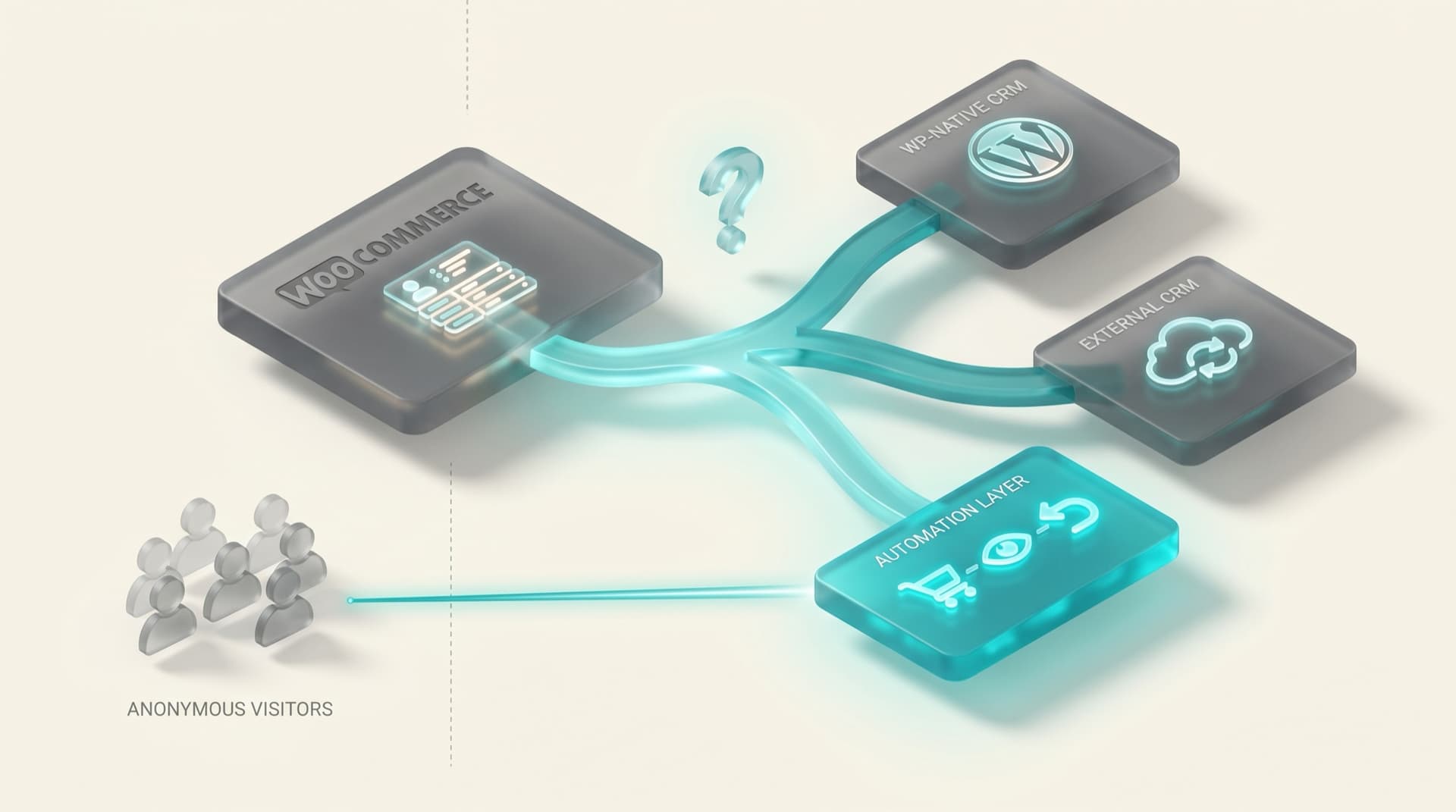
Once you know the job, the options sort into three groups. The live AI Overview for "woocommerce crm" already splits the first two; the third is the one the roundups tend to miss.
WordPress-native CRMs. Jetpack CRM, FluentCRM, and Groundhogg run inside your WordPress install. The defining trait is that your customer data never leaves your server, which matters for privacy, cost, and control. They read WooCommerce data directly, with no sync lag, and they pair customer records with email and automation in one place. For a store that wants to stay in the WordPress ecosystem and own its data, this is usually the right tier.
Adrian Tobey, founder of Groundhogg, has argued for years that automation works better when the engine sits next to the store data instead of syncing it out to a distant platform, because the further behavior has to travel before a tool acts on it, the more it flattens into a generic send (Do the Woo). That is the core argument for the native tier, and it is a real one.
External sales platforms. HubSpot, Zoho, ActiveCampaign, and Salesforce sync your WooCommerce data out to a cloud platform built for sales and marketing at scale. They bring strong pipeline management, lead scoring, reporting, and team features that the native tools do not match. The trade-offs are a data sync to manage, a higher price, and a lot of capability a typical DTC store will never use. These earn their keep for the B2B, wholesale, and high-touch cases above, and we cover the HubSpot path specifically in WooCommerce + HubSpot.
The automation layer. The third option is not a CRM in the pipeline sense at all. It is a behavior-and-identity layer that sits on top of WooCommerce, holds the customer data you need, and runs the marketing flows, cart, browse, post-purchase, winback, off real-time behavior, including for visitors a traditional CRM never records. For the many stores whose real need was automation rather than a pipeline, this is the tier that matches the job. The full architecture is in The Modern Ecommerce Email Stack.
| Kind | Examples | Best for | Trade-off |
|---|---|---|---|
| WordPress-native | Jetpack CRM, FluentCRM, Groundhogg | Staying in WordPress, owning your data, no sync | You run and scale it on your own host |
| External sales platform | HubSpot, Zoho, ActiveCampaign, Salesforce | B2B, wholesale, high-touch sales pipelines | Data sync to manage, higher cost, unused features |
| Automation layer | A behavior-and-identity layer on top of WooCommerce | DTC stores whose real need is marketing automation | Not a sales pipeline; built for behavioral marketing |
A WooCommerce CRM comes in three kinds: WordPress-native tools like Jetpack CRM, FluentCRM, and Groundhogg that keep data on your server; external sales platforms like HubSpot, Zoho, and Salesforce that sync data to the cloud for pipeline-driven selling; and a marketing automation layer that runs behavioral flows on top of WooCommerce. DTC stores usually need the first or third; the external platforms fit B2B and high-touch sales.
What every CRM misses: the customers it never sees
Whichever tier you choose, there is a limit they all share, and it is the one most worth understanding before you spend money.
A CRM is a record of people you can identify. To create a contact, it needs an email address or an account, which means the shopper logged in, checked out, or subscribed. On a store running paid acquisition, that is the minority of traffic. Between 80 and 95 percent of paid Meta and Google visitors never identify themselves, so they never become a CRM contact at all. They browse, they abandon carts, and they leave, and your CRM, native or external, has no record they existed.
This is the gap that no amount of CRM selection closes, because it is not a CRM problem, it is an identity problem. A CRM manages the relationships you already have. It does nothing for the anonymous majority who are shopping right now and have not raised their hand. Closing that gap takes a visitor-identification layer that resolves a share of anonymous traffic into contactable profiles and feeds them into whatever system holds your customers. The mechanics, identity graphs and server-side tracking and the privacy posture around them, are in our website visitor identification guide.
The point for this decision is simple. Choosing a CRM decides how well you serve the customers you already know. It does nothing about the ones you do not, and for most stores that second group is larger and more valuable than the first.
How to choose
Match the tier to the store, not to the longest feature list. This table maps the common cases.
| Your store | Start with | Why |
|---|---|---|
| Small DTC store, newsletter plus orders | WooCommerce native data + your email tool | You already have the customer data; do not buy a pipeline you won't use |
| Growing DTC store, leaking cart and browse revenue | Automation layer | The real need is behavioral marketing, not a sales pipeline |
| Want to own data and stay in WordPress | WordPress-native CRM (FluentCRM, Groundhogg, Jetpack CRM) | Data on your server, no sync, automation included |
| B2B, wholesale, or high-touch sales | External sales CRM (HubSpot, Zoho, Salesforce) | A real human pipeline needs real pipeline tooling |
| $5K+/mo paid traffic, lots of anonymous visitors | Automation layer + visitor identification | A CRM only holds identified contacts; this recovers the rest |
| Already on HubSpot or ActiveCampaign | Keep it, add behavioral depth on top | The platform handles records; the layer handles the flows it underbuilds |
The thread running through the table: a sales CRM is for stores that sell through people, and most WooCommerce stores sell through a checkout. When the need is marketing rather than pipeline, the native tier or the automation layer fits better and costs less.
Rodolfo Melogli, who has run Business Bloomer since 2011 teaching WooCommerce store owners, makes a version of this point constantly: stores buy plugins to solve problems they have not defined, and the fix is to name the job first (Business Bloomer). A CRM is the textbook case. Name the job, then the tier is obvious.
How this fits on WooCommerce
In practice, most WooCommerce stores land in one of two places, and neither is a traditional sales CRM.
If you want everything in WordPress, a native CRM like FluentCRM or Groundhogg holds your customer data and runs your automation on your own server, reading WooCommerce directly. If you would rather keep your existing email tool and just add the behavioral flows and the anonymous-visitor recovery it lacks, the automation layer sits on top and does that without moving your data or adding a pipeline you do not need. Either way, WooCommerce stays the source of truth for orders and customers, which it already is.
The stores that should reach for an external sales CRM know who they are: they have salespeople, accounts, and deals. For everyone else, the question "which WooCommerce CRM" usually resolves to "actually, marketing automation," and the sooner you name that, the less you overspend. The full stack this fits into, across every ESP and tool cohort, is laid out in the WooCommerce email marketing 2026 pillar, and the tool landscape ranked by lock-in is in Top 10 WooCommerce email automation tools.
The word "CRM" has sold more software that nobody uses than almost any other three letters in this industry. Store owners hear it, assume they are supposed to have one, and buy a sales pipeline built for a B2B rep when what they run is a checkout. WooCommerce already knows who your customers are and what they bought. The question was never which CRM. It was what job you are trying to do, and for most stores the job is marketing to people automatically, including the ones who have not told you their name yet. Buy for that.
— Bob Thordarson, Geysera CEO
Frequently asked questions
Does WooCommerce have a CRM?
WooCommerce does not include a full CRM, but it stores the core of one: a customer record for every order, with contact details and complete purchase history, viewable in your WordPress admin. For a small store, that native data plus an email tool covers a lot. You add a dedicated CRM to do something WooCommerce does not, such as running a sales pipeline or driving behavioral marketing automation, not just to hold customer data you already have.
What is the best CRM for WooCommerce?
There is no single best one, because it depends on the job. For staying in WordPress and owning your data, WordPress-native CRMs like FluentCRM, Groundhogg, and Jetpack CRM fit. For B2B or high-touch sales pipelines, external platforms like HubSpot, Zoho, or Salesforce are stronger. For a DTC store whose real need is marketing automation rather than a pipeline, an automation layer on top of WooCommerce is usually the better match. Name the job first, then the choice is clear.
Do I really need a CRM for my WooCommerce store?
Often not in the sales-pipeline sense. If you sell direct to consumers through a checkout with no human sales process, a traditional CRM solves a problem you do not have. What you usually need is customer data, which WooCommerce partly gives you, plus marketing automation to act on customer behavior. If you run B2B, wholesale, or high-ticket sales with real deals and reps, then yes, a CRM is worth it.
What are the three types of WooCommerce CRM?
WordPress-native CRMs (Jetpack CRM, FluentCRM, Groundhogg) that run inside WordPress and keep data on your server; external sales platforms (HubSpot, Zoho, ActiveCampaign, Salesforce) that sync your data to the cloud for pipeline-driven selling and reporting; and the marketing automation layer that sits on top of WooCommerce to run behavioral flows without being a sales pipeline. Most DTC stores fit the first or third; the external platforms suit B2B and high-touch sales.
Is there a free WooCommerce CRM?
Yes. Jetpack CRM has a free tier that connects to WooCommerce, and FluentCRM and Groundhogg offer free or low-cost entry points, all running inside WordPress. HubSpot also has a free CRM tier with a WooCommerce connector. Free is a fine place to start, but choose based on the job you need done rather than the price, since the cost of the wrong tool is the time you spend not using most of it.
What is the difference between a CRM and a marketing automation layer?
A CRM is a system of record for customers and, in the sales sense, for deals in a pipeline. A marketing automation layer is built to act on customer behavior automatically, sending the right flow when someone abandons a cart, browses, or lapses, including for visitors a CRM never recorded. They overlap, and some tools do both, but if your need is behavioral marketing rather than tracking deals, the automation is the part that matters and the pipeline is the part you will ignore.
Continue the series
This is post 12 of 17 in the WooCommerce Email Marketing in 2026 series.
- Start with the pillar: WooCommerce email marketing 2026 — the complete stack
- Previous in series: WooCommerce Abandoned Cart Recovery: The 2026 Playbook
- The architecture behind the automation-layer option: The Modern Ecommerce Email Stack: Why Two Tools Beat One
If you want the WooCommerce-specific automation layer that holds your customer data and runs the behavioral flows (including for the anonymous visitors a CRM never records) on top of whatever you already use, that is what Geysera is built for.
Sources

Co-Founder and CEO
Bob Thordarson is CEO and Co-Founder of Geysera, a serial entrepreneur with 25+ years and five co-founded ventures, including Cequint (acquired by TNS in 2010 for $112.5M) and Consumerware (acquired by ParkerVision). A graduate of the University of Washington and MIT Entrepreneurial Masters Program, based in Seattle, he serves on the boards of DRY Soda Co. and the Entrepreneurs' Organization Seattle chapter. He is an expert in retention marketing email systems and methodology for ecommerce and B2B brands — measured by incremental revenue, not vanity metrics.