Cold Email Deliverability: How to Email Identified Visitors Without Torching Your Domain
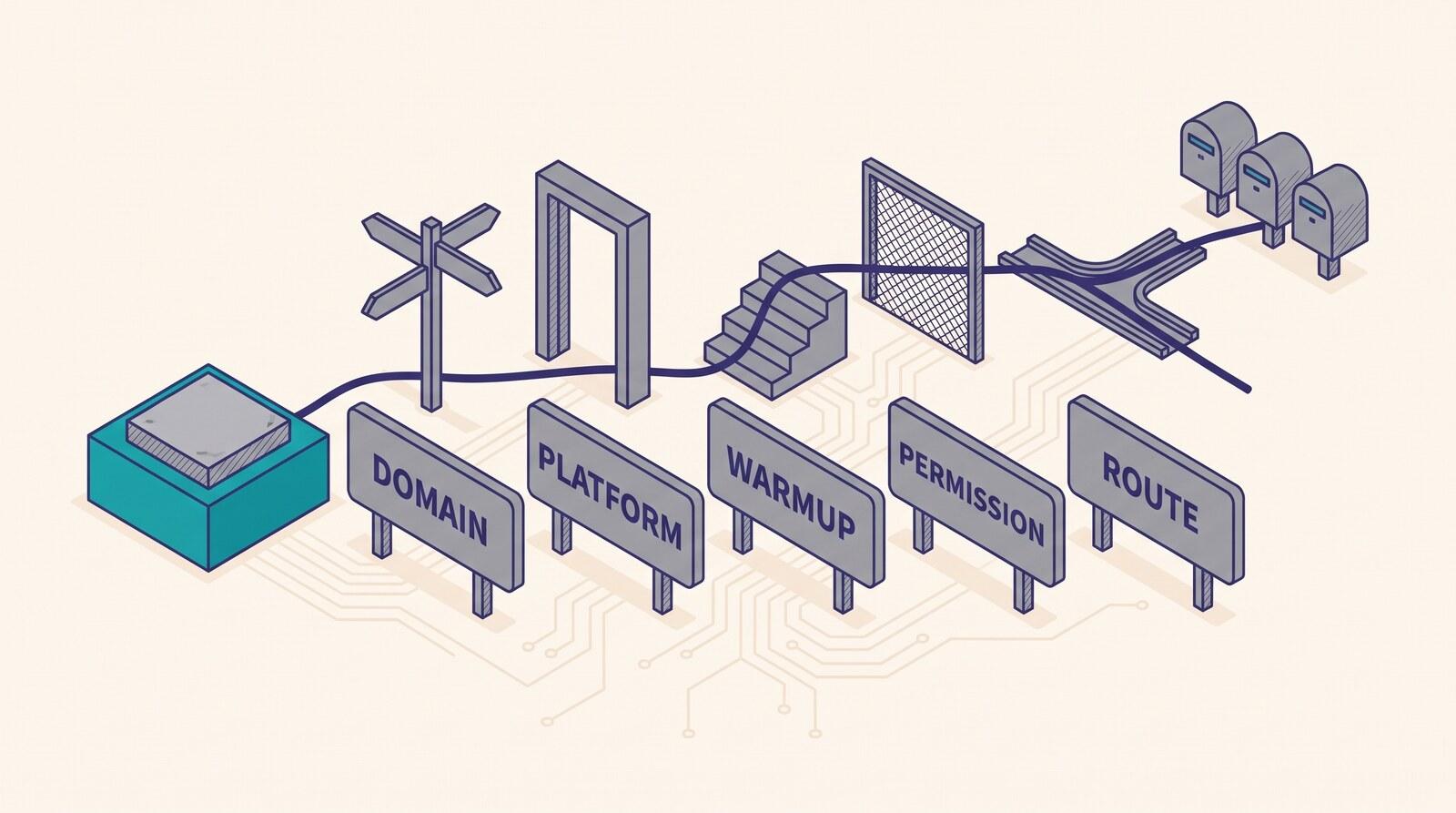
Google's Postmaster Tools reports spam rates only for messages sent to personal Gmail accounts, which means the dashboard most senders are told to watch cannot see mail sent to a work address. This guide covers the five sending decisions that follow from that: which domain the mail leaves from, which platform you send it from, how fast you ramp, which addresses your ESP allows, and whether the send belongs in the ESP or the CRM.
Cold email deliverability is the share of outbound messages that reach an inbox rather than a spam folder or a rejection, measured for mail sent to people who never asked to hear from you. For an identified website visitor, the address came from an identity graph rather than a signup form, which changes what you can measure.
A team turns on identification, pushes the resolved contacts into the same ESP that sends the customer newsletter, and watches the dashboard. Complaints read zero, bounces under one percent. Opens look fine. Six weeks later the newsletter's revenue is down and nobody can say when it started, because not one of those three numbers was ever measuring the new sending.
KEY STATS
- Google asks senders to keep spam rates in Postmaster Tools under 0.10% and to avoid ever reaching 0.30%, and states that maintaining a high spam rate leads to increased spam classification (Google Workspace Admin Help, 2026)
- Data in Google Postmaster Tools applies only to messages sent to personal Gmail accounts, meaning addresses ending @gmail.com or @googlemail.com (Google Workspace Admin Help, 2026)
- Gmail counts a sender as a bulk sender at close to 5,000 messages a day to personal Gmail accounts, and counts every message from the same primary domain toward that figure, including messages from its subdomains (Google Workspace Admin Help, 2026)
- Bulk-sender status at Gmail has no expiration date once a sender meets the criteria even once (Google Workspace Admin Help, 2026)
- Google Workspace caps a single user account at 2,000 messages a day, 3,000 external recipients a day and 10,000 total recipients a day (Google Workspace Admin Help, 2026)
- Microsoft Exchange Online caps a single mailbox at 10,000 recipients in any 24-hour period (Microsoft Learn, 2026)
- Around 98% of website visitors arrive anonymous, a share that includes customers who are logged out as well as people who have never converted (Twilio Segment, 2026)
- Estimates of B2B contact decay run from 22.5% a year (HubSpot's model, from MarketingSherpa research of about 2013) to 25-30% (ZoomInfo's industry benchmark)
- Data compiled from Google Workspace Admin Help, Microsoft Learn, Twilio Segment, HubSpot/MarketingSherpa and ZoomInfo, September 2026
What's in this guide:
- What cold email deliverability means when the address came from a graph
- What your deliverability dashboard can and cannot see
- Decision 1: which domain the mail leaves from
- Decision 2: which platform you send from
- Decision 3: how fast you ramp, and what warming actually does
- Decision 4: which addresses you are allowed to send to
- Decision 5: whether the send runs in the ESP or the CRM
- List hygiene when you did not collect the list
- What none of this fixes
- Feed, don't send
- Frequently asked questions
What cold email deliverability means when the address came from a graph
Ordinary deliverability advice assumes a list you built. Somebody typed their address into a form on your site, confirmed it, and started receiving mail they remember asking for. Every default in every ESP is tuned for that population, and the metrics that describe it are meaningful because the recipients are people who can plausibly recognize you.
An identified visitor is a different object. Around 98% of website visitors arrive anonymous, and this is what one of them looks like: the person browsed, left, and never typed anything. The address arrived from an identity graph, which is a database that stitches cookies, device signals, IP ranges and third-party profiles into a single record. The identity graph post covers how that stitching works and why the same visitor resolves deterministically one day and probabilistically the next. The match-rate post covers why the share of visitors any tool resolves is so hard to pin down.
Filters are trained on whether recipients want the mail, and a person who never gave you an address has no reason to want it. Given that you're going to send some of it anyway, which five infrastructure decisions determine whether the damage lands on a throwaway asset or on the domain your invoices go out from?
Those five decisions are the domain, the platform, the ramp, the address list, and the system that runs the send. The measurement problem comes first, because it changes how much you can trust your own answers to all five.
What your deliverability dashboard can and cannot see
Most playbooks open by telling you to watch your spam-complaint rate in Google Postmaster Tools. That target is real, and Google publishes both halves of it: keep spam rates under 0.10%, and avoid ever reaching 0.30% or higher.
Google's own setup documentation adds one line: "Data in Postmaster Tools only applies to messages sent to personal Gmail accounts. A personal Gmail account is an account that ends in @gmail.com or @googlemail.com."
Read that against the work-email-only default that B2B outreach runs on. If you're sending to named people at company domains, and those domains are hosted on Google Workspace or Microsoft 365, Postmaster Tools reports on approximately none of it. The dashboard answers a question about a population you deliberately excluded.
The same gap runs through the other three signals. Laura Atkins, a partner at Word to the Wise with over twenty years spent helping companies manage mailing risk, laid out why three of the four signals below read clean regardless of what the mail is doing:
"The 'ideal' numbers for B2B mail are readily explained. List hygiene services remove any bounces before the list is mailed. Opens are actually pre-fetches or spam filtering appliances fetching all images before delivery. Complaints are zero because FBLs don't exist in the B2B space." — Laura Atkins, Partner, Word to the Wise (About that cold email)
A feedback loop, the FBL in that quote, is the mechanism by which a mailbox provider tells a sender that someone hit the spam button. Consumer providers run them. Corporate mail systems almost never do, which means a zero complaint rate on a B2B send usually records the absence of a reporting channel rather than a clean send.
| Signal you're told to watch | Population it reports on | What it can't tell you |
|---|---|---|
| Postmaster Tools spam rate | Messages to personal @gmail.com and @googlemail.com accounts only | Anything about mail to a work address on Google Workspace |
| Postmaster Tools domain reputation | The same personal-Gmail population, in a dashboard Google says it will retire | How Microsoft 365 tenants are treating the same domain |
| ESP-reported complaint rate | Recipients at providers that operate a feedback loop | Complaints at corporate mail systems, which generally run none |
| Bounce rate | Addresses that rejected the message at send time | Much of anything, if a hygiene service removed the dead addresses before the file was uploaded |
| Open rate | Images loaded, by anyone or anything | Whether a person opened it, since prefetches and security appliances load images too |
The takeaway: Every signal in the standard monitoring stack misreads business mailboxes, and B2B outreach targets business mailboxes almost exclusively. Google states that Postmaster Tools covers personal Gmail accounts only. Laura Atkins attributes zero B2B complaint rates to the absence of feedback loops rather than to recipient satisfaction. A clean dashboard on a work-email send is usually a coverage gap.
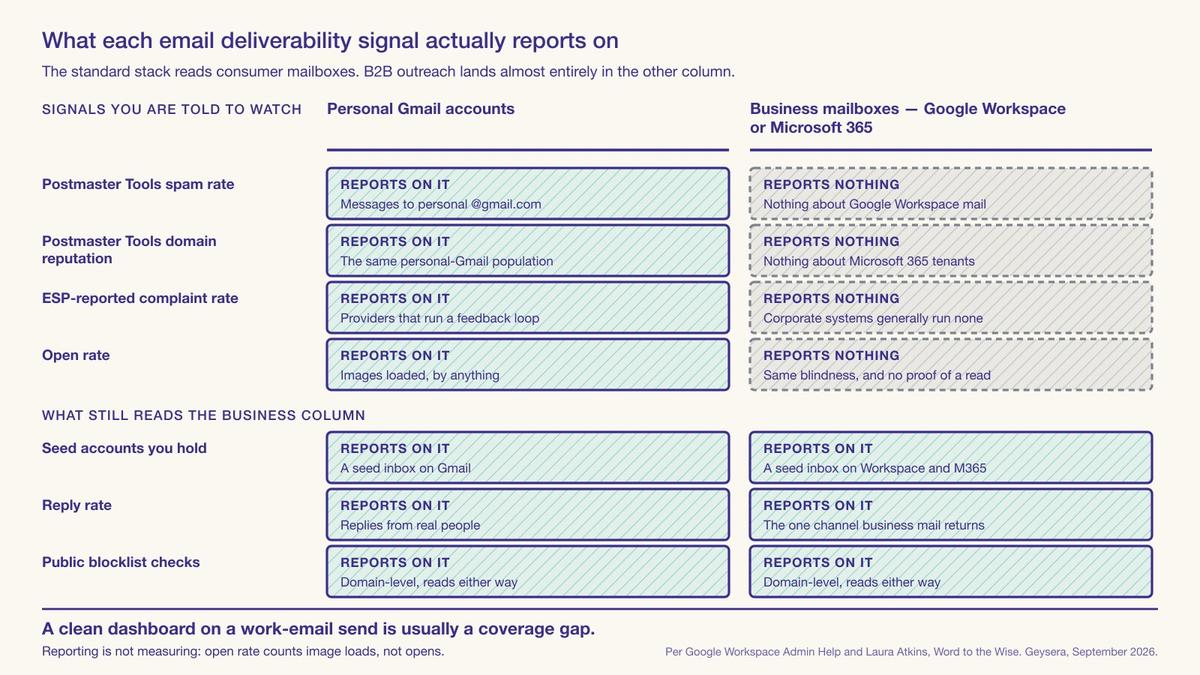
The measurements that still work are manual. Hold a seed account of your own on Google Workspace and another on Microsoft 365, send every campaign to both, and look at where the message lands. Read reply rates as a quality signal rather than a vanity one, and check periodically whether your primary domain has appeared on a public blocklist. Set those up before the first send, because afterwards you'll never have a baseline to compare against.
Decision 1: which domain the mail leaves from
Three options exist. Send from the primary domain, send from a subdomain of it, or register a separate domain. The reasoning for a subdomain is that it inherits some trust from the parent while keeping its own reputation, and it's cheap. The reasoning for a separate domain is complete isolation at the cost of starting from nothing.
Google's sender guidelines FAQ says that when it calculates the bulk-sender threshold, which it puts at close to 5,000 messages a day, it counts all messages sent from the same primary domain, and it gives the worked example directly: 2,500 messages from solarmora.com plus 2,500 from promotions.solarmora.com makes you a bulk sender, "because all 5,000 messages were sent from the same primary domain." A subdomain never gives you a separate identity for that calculation. Google also states that bulk-sender status doesn't expire once you've met the criteria even once.
The threshold counts messages to personal Gmail accounts, so a strictly work-email program may not approach it. And Google publishes how it aggregates volume to the primary domain. How it aggregates reputation is not published.
If the cold program is small and aimed at work addresses, a subdomain with its own SPF record, its own DKIM key and a DMARC policy scoped to it is usually proportionate. Gmail requires SPF or DKIM from every sender, whatever the volume. Microsoft has required all three since May 5, 2025, from anyone sending more than 5,000 messages a day to its consumer domains, and rejects what fails. Yahoo holds every sender to SPF or DKIM and a spam rate below 0.3%, and requires bulk senders to add DMARC, a one-click unsubscribe header and unsubscribes honoured within two days. Since November 2025 Gmail has been ramping up enforcement, and mail that misses its requirements can now be rejected, temporarily or permanently. If the program is large enough to approach bulk-sender volume at Gmail, a subdomain won't insulate the parent from that status, and a separate registered domain is the only structure that does. Either way, the receiving side will eventually connect a lookalike domain to the brand it's imitating, so a separate domain buys isolation rather than anonymity.
Decision 2: which platform you send from
Mail sent from a Google-hosted account to a Microsoft-hosted mailbox crosses a boundary between two systems that each score the other's traffic. It runs in both directions. Al Iverson, Valimail's Industry Research and Community Engagement Lead, who has been blogging about spam since 2001, describes it plainly on his own site:
"It's possible […] to be sending to Microsoft-hosted mailboxes from a Google-hosted email account, and find that the mail goes to spam because of some reputation issue between these two big goliaths. It can and does sometimes happen, in either direction. […] If you're all within the same walled garden, you potentially bypass some of these issues." — Al Iverson, Industry Research and Community Engagement Lead, Valimail (Help: My Gmail biz domain emails are going to spam!)
His advice, and he flags himself that he's simplifying, is to check where your recipients' mailboxes are hosted and move your own sending to that platform. A public DNS lookup of each recipient domain's MX record usually tells you which. It won't when the domain sits behind a security gateway such as Proofpoint or Mimecast, because the MX record then names the gateway rather than the mailbox host behind it.
The cold-email tooling industry has built something larger on that finding, selling racks of Google Workspace and Microsoft 365 inboxes and routing each prospect to a matching one. We're not recommending it, for two reasons. The published inbox-placement figures used to justify it come from the tool vendors selling the inboxes, with no stated methodology or sample size. And spreading the same mail across more accounts never changes whether the recipients wanted it, which is the thing the filters score.
If most of your prospects are on Microsoft 365 and your company runs on Google Workspace, that mismatch is a plausible source of spam placement on Iverson's account of it, and consolidating your outbound onto the matching platform is a legitimate fix. Spreading volume across dozens of inboxes on both platforms is the practice M3AAWG names as evasion of spam filters.
| Platform | Limit | Published value |
|---|---|---|
| Google Workspace | Messages a day, per user account | 2,000 |
| Google Workspace | External recipients a day, per user account | 3,000 |
| Google Workspace | Total recipients a day, per user account | 10,000 |
| Google Workspace | Messages a day sent by mail merge, per user | 1,500 |
| Microsoft Exchange Online | Recipients per mailbox in 24 hours | 10,000 |
| Microsoft Exchange Online | Messages per minute, per mailbox | 30 |
| Microsoft Exchange Online | External recipients a day, per tenant (TERRL) | Set by the tenant's licence count |
| Gmail (receiving side) | Bulk-sender threshold, counted per primary domain | about 5,000 messages a day to personal Gmail accounts |
The takeaway: For outbound to strangers at other companies every recipient is external, so Google Workspace's binding limit is 2,000 messages a day per user, below the 3,000 external and 10,000 total recipients the same page also lists. Exchange Online allows 10,000 recipients per mailbox in any 24-hour period, at up to 30 messages a minute. Both platforms publish these as per-account limits on ordinary business mail.
Decision 3: how fast you ramp, and what warming actually does
Warming means increasing send volume gradually from a new domain or mailbox so that receiving systems see a rising pattern rather than a sudden one. The underlying idea is sound and predates cold email by decades. Reputation systems respond to change, and a domain that sent nothing yesterday and thousands of messages today looks exactly like a compromised account.
What's changed is the tooling. A large category of warmup services now works by creating artificial engagement: networks of accounts that open, reply to and drag each other's messages out of spam folders to manufacture positive signals. Two of the bodies closest to the receiving filters have named it in writing.
M3AAWG published its Position on Cold Email in November 2025. Iverson, who flagged the document when it appeared, describes its membership as including the largest mailbox providers, Microsoft, Apple, Google and Yahoo among them. It states that attempts to "bypass mail volume limits, avoid spam filters, mask sending domains, artificially simulate subscriber engagement, or use other tools or services that exploit loopholes in mailbox providers or cloud platforms are particularly egregious and are not acceptable in any manner." Spamhaus had made a similar point five months earlier, listing warmup tools and fake engagement services among the practices it treats as spam enablement.
There's also an arithmetic problem with the standard low-volume approach, and Al Iverson has laid it out: teams that follow "all the tips and tricks around keeping volume low and using multiple domains" find that "those low volumes plus low numbers of complaints equal high complaint percentages, still tanking deliverability and driving spam folder placement." Complaint rate is a ratio. Cutting the denominator to a few dozen sends a day per mailbox doesn't reduce the rate. On a small enough denominator, two complaints will always put you past 0.30% on their own. That arithmetic bites hardest on the consumer addresses in your file, because Gmail measures those and never reports on the rest.
Send mail that people are likely to reply to. Start at low volume, because the pattern matters, and always increase over weeks rather than days. Watch reply rate, because it's the one thing the artificial-engagement services exist to fake.
Decision 4: which addresses you are allowed to send to
This decision is usually treated as a legal question. Legally it mostly is one, and the compliance post in this cluster takes up consent, CAN-SPAM and the state privacy statutes. But there's a second layer that applies well before any law does, and it's contractual: your ESP has already told you in writing which addresses you may upload.
| Organization | Document | What it says in writing |
|---|---|---|
| Klaviyo | Acceptable Use Policy | Prohibits sending to contacts "that are purchased, rented, borrowed, third-party owned/provided or any other lists that have not consented to receive communications, promotions or advertisements from your business" |
| Mailchimp | Acceptable Use Policy | Prohibits sending campaigns "to purchased, rented, third-party, co-reg, publicly available data, or partner lists of any kind" |
| M3AAWG | Position on Email Appending | Defines appending as correlating known or assumed data on an individual to an email address "assumed to be owned by the individual for the purpose of sending email", and states that the practice "is an abusive practice" |
| M3AAWG | Position on Cold Email (Nov 2025) | States that "the specific form of consent received to market to an individual is not transferable between multiple marketing channels" |
| Spamhaus | Take on Cold Emailing (Jun 2025) | States that "permission is not transferrable", and that it will assess bulk cold outreach hitting its spamtraps as a candidate for listing |
The takeaway: Two of the ESPs most commonly paired with identification tools prohibit third-party-provided contacts by name in their acceptable use policies, and Klaviyo's wording covers contacts that are "third-party owned/provided" specifically. M3AAWG defines email appending as correlating assumed data to an address for sending, calls it abusive, and states that consent does not transfer between channels. These are contract terms and industry positions, not laws, and they bind before any law is reached.
The distinction that decides where your contacts fall is the one the ecommerce visitor identification post draws in detail. A tool that resolves an anonymous session back to someone already in your own database is doing a lookup against data you collected, and the consent you hold still applies. A tool that returns an address from a third-party graph for a person who has never given you anything is doing an append, whatever the product page calls it. The first is generally within your ESP's terms. The second generally isn't, and a lot of teams read the clause only after a suspension.
Decision 5: whether the send runs in the ESP or the CRM
If the contacts don't clear your ESP's terms, there's an obvious workaround: run the send from the CRM or from a dedicated outbound tool instead, on separate infrastructure, and keep the ESP for the opted-in list.
Different domain, different sending infrastructure, different reputation. That certainly protects the opted-in list, it's the structure most competent outbound teams run, and it beats mixing both populations into one ESP account.
It doesn't change whether the recipients wanted the mail, which is what the filters score, and it doesn't change the contractual position of the CRM or outbound tool, which has terms of its own that are worth reading before the migration rather than after.
There's a practical argument for the split that has nothing to do with policy. An ESP and a sales outbound tool are built for different jobs: one is built around broadcast to a list and the other around sequenced one-to-one mail with reply detection and automatic suppression on response. Sequenced one-to-one mail at least matches how a stranger expects to be contacted, and reply detection is the only feedback channel that still functions on business mailboxes, per the measurement problem above. Routing identified visitors into the CRM covers how the record gets there with an owner attached, which is the prerequisite for any of this.
List hygiene when you did not collect the list
Everything above concerns infrastructure. The addresses themselves matter more for graph-sourced contacts than for a list you built, because you have no signup event, no confirmation click and no engagement history to fall back on.
- You must validate every address before the first send, not after the first bounce. Hard bounces are one of the reputation metrics M3AAWG names as an indicator of cold email, alongside spam-trap hits and blocklisting. An unvalidated graph-sourced list will usually carry a meaningful share of dead addresses.
- Always treat the decay rate as a planning number. Contact data goes stale as people change jobs. HubSpot's decay model, built on MarketingSherpa research from about 2013, puts the loss at 22.5% a year, and ZoomInfo puts it at 25-30%. A record resolved eight months ago is materially likelier to bounce than one resolved last week.
- Suppress role accounts. Addresses like
info@,sales@andsupport@aren't people, they often route to shared inboxes and ticketing systems, and mail to them tends to produce complaints without producing replies. - Never send to an address you can't tie to the session that produced it. M3AAWG notes that appended data is "often prone to errors or incorrect correlations", and adds that an address accepting a message "does not imply it was delivered to the intended recipient". The match-rate post covers the accuracy question in detail; the operational version is that a wrong match is a stranger receiving mail about somebody else's browsing.
- Keep the suppression list permanent and global. An unsubscribe from the cold program must suppress that person everywhere, including in the ESP, because the same human may later become a customer and will never distinguish between your two sending systems.
What none of this fixes
The five decisions keep a bad outcome off your primary domain, and they never make the underlying mail wanted.
Filters score recipient reaction. Laura Atkins's assessment of where B2B cold email sits is that "the filters don't rely on sender metrics, they look at recipient reactions", and that the filters have been catching up with the evasion techniques. Spamhaus's position, published in June 2025, is that bulk cold email meets its standard definition of spam, which turns on consent rather than content. M3AAWG's November 2025 position is narrower and aimed at deceptive delivery methods rather than at outreach as such, but the practices it names cover most of what the tooling industry sells.
The ecommerce visitor identification post covers the B2C version of this failure, including one vendor founder's own published account of blending higher complaint rates into a brand's overall volume so the average stays survivable. Blending moves the average without stopping the complaints accruing against the domain that sent them.
Signal creates and updates records in Klaviyo and Mailchimp, and the clauses quoted above apply to records arriving through us exactly as they apply to any other source. Signal resolves on two paths, and they fall on opposite sides of the line Decision 4 draws. A returning visitor matched back to someone already in your database is a lookup against data you collected, and the consent you hold still covers it. A visitor resolved through a third-party identity network is an append by the definition above.
Identity networks generally claim a consent basis of some kind, and the one behind this path is no exception. We never treat that claim as permission to mail. M3AAWG's position, quoted above, is that consent does not transfer between channels, and Spamhaus states that permission is not transferable at all. A network's own consent claim is not the thing we rely on.
So no third-party-resolved record is written into your ESP on resolution. It is held until that person becomes first-party to you through a purchase or a form you own, and it is written on that event with the earlier sessions attached. Until then the ESP has nothing to mail, and you keep the session and the attribution. Signal does write the resolved record to your CRM on resolution, because the people it resolves are typically B2B buyers and the CRM is where a sales team works them. What you may send is still governed by your agreement with your ESP, and that agreement is yours rather than ours.
US telemarketing rules already apply that existing-relationship test to the phone channel: 16 CFR 310.2(q) defines an established business relationship as a purchase, rental, lease or financial transaction within 540 days, or an inquiry or application within 90 days. Regulators drew that line for calls because a number you were handed by a third party is still a stranger's number. We run the same test before a resolved record reaches your ESP.
Feed, don't send
Signal identifies visitors and hands them to the systems you already run. It creates or updates records in HubSpot, Klaviyo or Mailchimp, posts alerts to Slack and Teams, exports to CSV and hands payloads to webhooks you own. Salesforce and Marketo connections are coming soon, as is a warehouse export. It never sends email, doesn't run sequences and doesn't warm a mailbox. The pillar for this series calls that feed-not-send.
A team without a sequencing tool gets records and alerts and has to go buy something else to act on them. A team that wanted one vendor for identification and outreach will find that several competitors bundle both, and we don't. We also publish no match rate, which means the volume you'll be sending is something you'll measure on your own traffic on the free tier rather than read off a published figure. What visitor identification costs sets out how the tiers compare.
When we scoped Signal we left the sender out, and bundling it would have been the easier sale. Most demos since have had someone ask why we don't just email the person for them. The cost is real: a team with no sequencing tool gets a record and a Slack ping and nothing else on day one. I'd still make the call, because the moment we own the sending we own a reputation problem on a domain that isn't ours, and the customer finds out about it six weeks later in a revenue report. — Bob Thordarson, Geysera CEO
Whether to email them at all is the question the other two posts in this cluster take up: should you email anonymous website visitors, and is it legal to email identified visitors.
Frequently asked questions
What is cold email deliverability?
Cold email deliverability is the share of unsolicited outbound messages that reach an inbox rather than a spam folder or a rejection. It differs from ordinary email deliverability because the recipients never subscribed, so the sender has no engagement history and receiving filters have no prior signal that the mail is wanted. Google asks senders to keep spam rates below 0.10% and never to reach 0.30%.
Does Google Postmaster Tools show my B2B email deliverability?
No. Google states that data in Postmaster Tools applies only to messages sent to personal Gmail accounts, meaning addresses ending @gmail.com or @googlemail.com. Mail sent to work addresses hosted on Google Workspace is not covered. A B2B sender watching a clean Postmaster Tools dashboard is generally looking at a population they are not sending to, rather than at evidence of a healthy program.
Should I use a subdomain or a separate domain for cold email?
A subdomain with its own SPF record, DKIM key and scoped DMARC policy is usually proportionate for a small program. It will not separate you from Gmail's bulk-sender threshold, because Google counts messages from the same primary domain together and gives subdomain traffic as its worked example. A program approaching that volume needs a separately registered domain to insulate the parent.
Does sending from Google Workspace improve delivery to Gmail?
Valimail's Al Iverson reports that mail crossing the Google and Microsoft boundary sometimes lands in spam because of a reputation issue between the two, in either direction, and suggests matching your sending platform to where most recipients are hosted. He notes he is simplifying. An MX lookup usually shows a recipient's host, unless a security gateway fronts it. Matching is a reasonable fix. Running many inboxes across both platforms is a different practice that industry bodies have named.
Do Klaviyo and Mailchimp allow emailing identified website visitors?
Both address it in writing. Klaviyo's acceptable use policy bars contacts that are purchased, rented, borrowed, third-party owned or provided, or on any other list that has not consented to hear from your business. Mailchimp bars purchased, rented, third-party, co-reg, publicly available data or partner lists of any kind. A tool that re-identifies someone already in your own database is doing something different from a tool returning an address from a third-party graph.
Does warming up a mailbox fix cold email deliverability?
Gradual volume increase from a new domain is sound practice. M3AAWG calls artificially simulating subscriber engagement not acceptable in any manner, and Spamhaus lists warmup tools and fake engagement services among the practices it treats as spam enablement. Al Iverson also notes that keeping volumes low raises complaint percentages rather than lowering them, because complaint rate is a ratio and the denominator shrinks too.
Continue the Series
This is Post 13 in Geysera's 19-part series on B2B anonymous visitor identification.
- Post 1 — Anonymous website visitor identification: the complete 2026 guide (pillar)
- Post 2 — How to identify anonymous website visitors: 5 methods and what each delivers
- Post 3 — What is an identity graph? How anonymous visitors get matched to real people
- Post 4 — Match rates decoded: why 40%+ person-level claims are usually fiction
- Post 5 — B2B intent data explained, and why most of it is flawed
- Post 6 — Person-level vs company-level identification
- Post 7 — The best website visitor identification tools
- Post 8 — Third-party cookies didn't die. The deprecation did.
- Post 9 — Lead routing for identified website visitors: from identified to pipeline
- Post 14 — Website visitor tracking: how to see who visits your website
- Post 10 — Is an IP address PII? What US privacy law means for identifying website visitors
- Post 11 — Should you email anonymous website visitors?
- Post 12 — Is it legal to email identified visitors?
Sources
- Email sender guidelines — Google Workspace Admin Help; the 0.10% target and the 0.30% ceiling
- Email sender guidelines FAQ — Google Workspace Admin Help; the 5,000-message bulk-sender threshold, the enforcement ramp from November 2025, the primary-domain counting rule with its subdomain worked example, and the non-expiry of bulk-sender status
- Set up Postmaster Tools — Google; "Data in Postmaster Tools only applies to messages sent to personal Gmail accounts"
- Gmail sending limits in Google Workspace — Google Workspace Admin Help; 2,000 messages a day per user (1,500 by mail merge), 3,000 external recipients a day, 10,000 total recipients a day
- Troubleshoot outbound sending limits in Exchange Online — Microsoft Learn; the 10,000-recipient limit per mailbox per 24 hours
- Strengthening the email ecosystem: Outlook's new requirements for high-volume senders — Microsoft Community Hub; SPF, DKIM and DMARC required from May 5, 2025 for senders above 5,000 messages a day to Microsoft consumer domains
- 16 CFR 310.2 — Definitions — Telemarketing Sales Rule, paragraph (q); the established-business-relationship definition, 540 days from a purchase or financial transaction and 90 days from an inquiry or application
- About that cold email — Laura Atkins, Word to the Wise, June 23, 2025; the B2B metrics explanation and the filters-catching-up assessment
- Help: My Gmail biz domain emails are going to spam! — Al Iverson, Spam Resource, May 29, 2025; the cross-platform reputation point and the matched-platform suggestion
- New M3AAWG publication: M3AAWG Position on Cold Email — Al Iverson, Spam Resource, November 2025; the low-volume, high-complaint-percentage arithmetic, and the description of M3AAWG's membership
- M3AAWG Position on Cold Email — M3AAWG, November 2025, version 1.0; deceptive delivery methods and the non-transferability of consent between channels
- M3AAWG Position on Email Appending — M3AAWG, updated January 2019; the definition of appending, the abusive-practice position, and the note on incorrect correlations
- Spamhaus' take on Cold Emailing…AKA spam — The Spamhaus Team, June 19, 2025; the unsolicited-bulk-email definition, the enabler practices, "permission is not transferrable", and the statement that bulk cold outreach hitting Spamhaus spamtraps is assessed as a listing candidate
- Klaviyo Acceptable Use Policy — Klaviyo; the consent and list-gathering prohibitions
- Acceptable Use Policy — Mailchimp (Intuit); the prohibition on purchased, rented, third-party, co-reg, publicly available and partner lists
- Laura Atkins — Word to the Wise; title and experience confirmation
- Identity resolution: what it is and how it works — Twilio Segment; "around upwards of 98%" of website visitors are anonymous, including visitors who "have converted but are logged out on arrival"
- Database Decay Simulation — HubSpot, citing MarketingSherpa; the 22.5% annual decay figure
- The Real Cost of Poor Data Quality for B2B Teams — ZoomInfo, updated July 7, 2026; the 25–30% annual decay range
- Sender Best Practices — Yahoo; SPF or DKIM and a spam rate below 0.3% for all senders; DMARC, one-click unsubscribe (RFC 8058 POST method recommended) and two-day unsubscribe handling for bulk senders
- Learn about the deprecation of the old Postmaster Tools interface — Google; the Domain and IP Reputation dashboards "will be retired"
- Exchange Online limits — Microsoft Learn; 30 messages a minute per mailbox and the Tenant External Recipient Rate Limit, which depends on the number of licences
- Cold email deliverability: the thresholds that decide inbox placement — ReplyLead; security gateways such as Proofpoint and Mimecast "may front another mailbox platform"
- DMARC and deliverability: connecting the dots — Valimail; Al Iverson title confirmation

Co-Founder and CEO
Bob Thordarson is CEO and Co-Founder of Geysera, a serial entrepreneur with 25+ years and five co-founded ventures, including Cequint (acquired by TNS in 2010 for $112.5M) and Consumerware (acquired by ParkerVision). A graduate of the University of Washington and MIT Entrepreneurial Masters Program, based in Seattle, he serves on the boards of DRY Soda Co. and the Entrepreneurs' Organization Seattle chapter. He is an expert in retention marketing email systems and methodology for ecommerce and B2B brands — measured by incremental revenue, not vanity metrics.